Last Updated: November 4, 2026
Quick Summary
Set up ergonomic office furniture by adjusting the chair first, then arranging the keyboard, mouse and monitor around it. Set seat height so your feet rest flat and thighs run roughly parallel to the floor. Keep elbows near 90 degrees, wrists straight, and the top of the monitor at or just below eye level.
- Set seat height first, with feet flat on the floor or on a footrest.
- Place the top of the monitor at or just below eye level, about an arm’s length away.
- Keep elbows at roughly 90 degrees with wrists straight while typing.
- Alternate sitting and standing roughly every 30 to 60 minutes.
- Take a 1- to 2-minute movement break every 30 to 45 minutes.
Table of Contents
- Why Ergonomic Office Furniture Setup Matters for Daily Comfort
- Choosing the Right Ergonomic Chair for Your Body
- Positioning Your Desk, Monitor, Keyboard, and Mouse
- Building an Ergonomic Workstation Checklist
- Sit-Stand Schedules, Movement Breaks, and Lighting Comfort
- When to Get Professional Installation Help Near You
- Set Up Your Ergonomic Workspace This Week
- Frequently Asked Questions
Why Ergonomic Office Furniture Setup Matters for Daily Comfort
Ergonomic office furniture is designed to fit the body and reduce strain across a full workday. Office Furniture Warehouse has more than 35 years of experience helping businesses and home workers choose furniture. Most discomfort at a desk does not come from one bad chair.
Think of the workstation as a system rather than a set of separate purchases. The chair, desk, monitor, keyboard and lighting all affect each other.
Choosing the Right Ergonomic Chair for Your Body
Start with the chair, because it carries most of your body weight for most of the day. Look for a model with independent seat height, a backrest that supports the lower back, and armrests you can raise, lower and move closer to the desk.
Fit matters more than brand names. A chair that works for a 6-foot-3 engineer may leave a 5-foot-2 administrative assistant with dangling feet and a gap behind the lower back.
Adjusting Seat Height and Lumbar Support
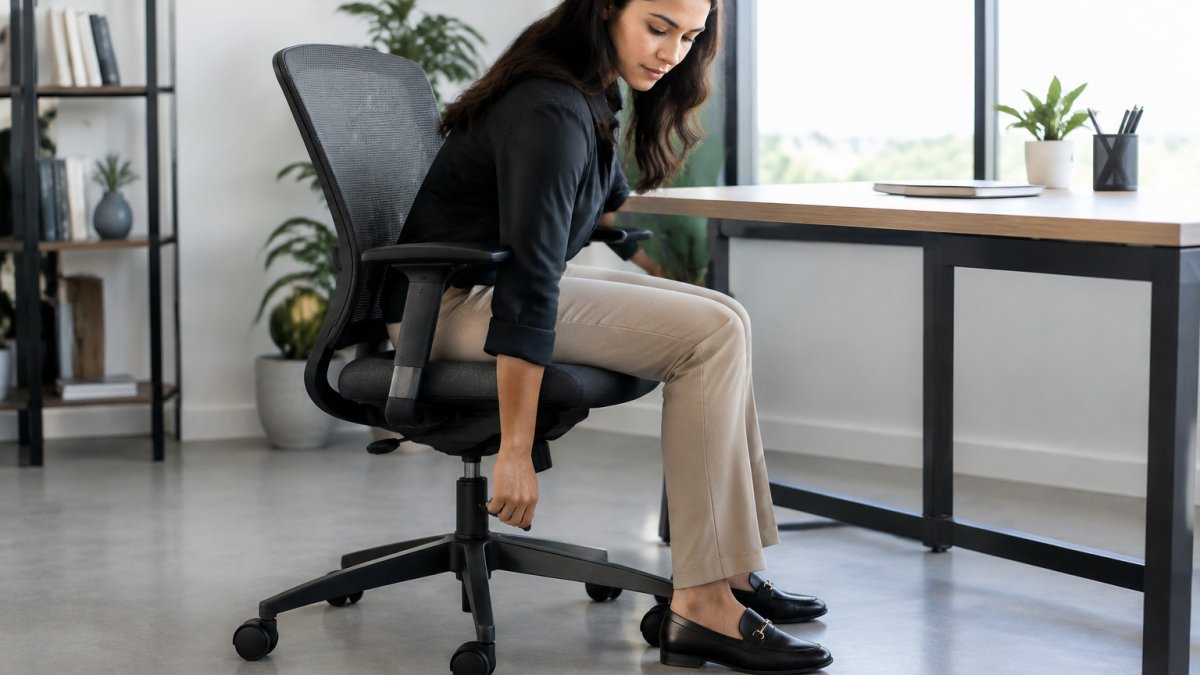
Set seat height first. If your feet cannot reach the floor, use a footrest rather than letting the seat stay too high. Step-by-step guidance for dialing in these chair controls walks through each adjustment in order.
Next, set lumbar support so the curve of the chair sits in the small of your back. You should feel gentle support, not pressure pushing you forward. Many chairs let you adjust the height of the lumbar pad, and some also allow you to adjust its depth. Make small changes and sit for a few minutes before deciding.
Achieving a Proper Ergonomic Sitting Position
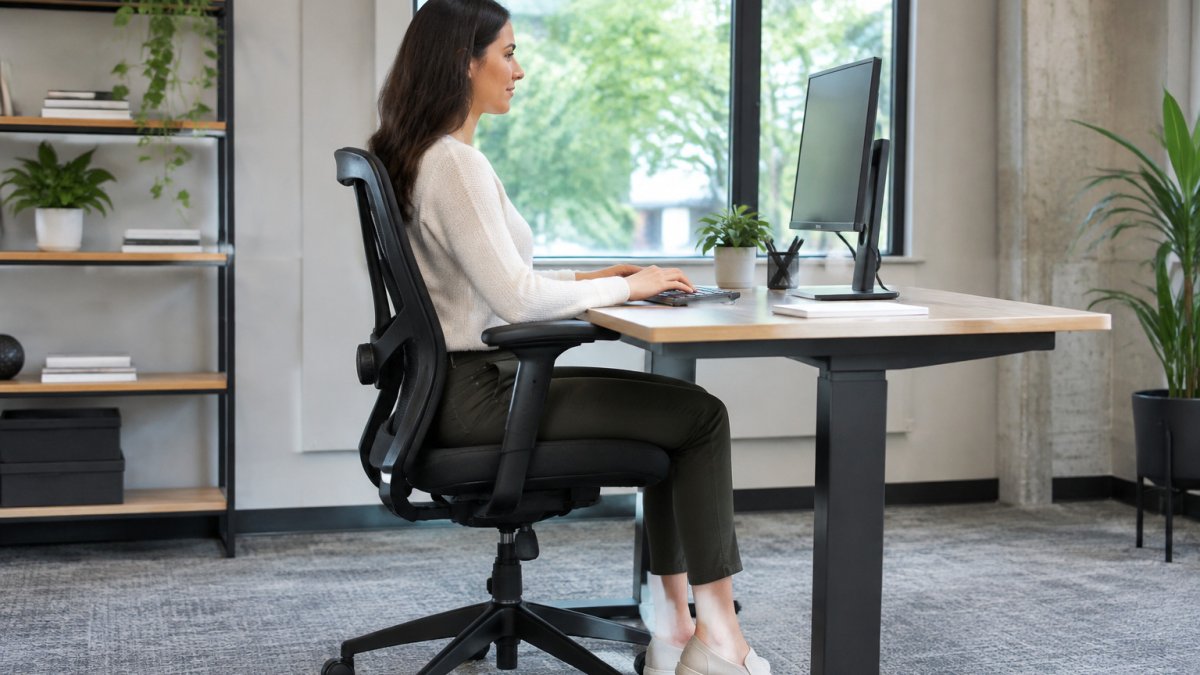
Sit with your back against the backrest, shoulders relaxed rather than hunched, and your head balanced over your shoulders. Keep your elbows bent at roughly 90 degrees with forearms level or sloping slightly down toward the keyboard. Your wrists should stay straight, not bent up or down.
A common mistake is leaning forward to reach the screen. If you find yourself doing that, the monitor is probably too far away or too low, and the fix belongs at the desk, not in your posture.
Positioning Your Desk, Monitor, Keyboard, and Mouse
Once the chair fits, arrange the work surface around it. The goal is a neutral zone where your elbows stay near your sides, your wrists stay straight, and your eyes do not have to hunt for the screen. Work in this order: keyboard and mouse first, then monitor, then desk height or accessories.
Keyboard and Mouse Placement
Place the keyboard directly in front of you, centered on your torso, with the mouse immediately beside it at the same height.
Measure the fit: with your hands on the home row, your wrists should be straight, not bent up or down, and your elbows should be at roughly 90 degrees.
Watch out: a keyboard placed on top of a desk that is set for standing height will force the shoulders up and the wrists into extension; lower the keyboard or use an adjustable tray before adjusting anything else.
Monitor Height and Viewing Distance
Set the top of the monitor at or slightly below eye level, with the screen roughly an arm’s length away.
A simple fit check: close your eyes, open them, and look at the screen. If you have to drop your chin or raise your forehead, the monitor is too low or too high.
For dual monitors, put the primary screen directly in front of you and the secondary screen at a similar height and angle, close enough that you can turn your head rather than twist your neck. Specific guidance on placing dual monitors ergonomically covers the arrangement in more detail.
Laptop-Only and Hybrid Configurations
A laptop used flat on a desk for long periods forces the neck down and the wrists up. The practical fix is a laptop stand plus an external keyboard and mouse, which separates screen height from hand height.
If you switch between home and office workstations, note the numbers: seat height, monitor height, keyboard tray height, and monitor distance. Repeating those measurements at the second desk takes a few minutes.
Desk Height and Accessories
If your desk is not height-adjustable, a monitor riser, a keyboard tray, or a footrest can correct the mismatches. A monitor arm frees desk space and makes height changes easy.
Measure the desk surface height relative to your seated elbow height. If the desk is too high, raise the chair and use a footrest; if it is too low, a desk riser or a height-adjustable desk is the cleaner fix.
The table below summarises the key fit measurements for each part of the desk setup.
| Element | Target | Check |
|---|---|---|
| Monitor top edge | At or just below eye level | Chin should not drop or lift |
| Screen distance | About an arm’s length | Roughly 20 to 30 inches from eyes |
| Monitor tilt | Back about 10 to 20 degrees | Top edge slightly farther away |
| Elbow angle | Roughly 90 degrees | Shoulders relaxed |
| Wrist position | Straight while typing | No bending up or down |
| Keyboard and mouse | Same height, within easy reach | Elbow stays near side |
Building an Ergonomic Workstation Checklist
Use this checklist after every setup change, and again whenever your work pattern shifts:
- Feet flat on the floor, or supported by a footrest
- Thighs roughly parallel to the floor, knees near hip level
- Lower back supported by the lumbar curve
- Elbows at about 90 degrees, shoulders relaxed
- Wrists straight while typing and using the mouse
- Top of the monitor at or just below eye level
- Screen about an arm’s length away, free of glare
- Keyboard and mouse at the same height and within easy reach
- Armrests adjusted so they do not lift your shoulders
- Desk clear enough to move your arms freely
Work through the list once a month for the first few weeks. Small drift is normal as chairs settle and people adjust their habits.
Sit-Stand Schedules, Movement Breaks, and Lighting Comfort
Even a perfect setup becomes uncomfortable when you stay in one position for hours. The furniture sets the baseline; how you use it across the day determines whether strain builds or resets.
Sit-Stand Schedules That Hold Up
A practical pattern is to alternate between sitting and standing roughly every 30 to 60 minutes, spending part of the day on your feet rather than treating standing as a full-time position.
Build the schedule around tasks, not just the clock. Stand for phone calls, short reading, or a quick review, and sit for focused typing or detailed work.
Watch out: standing all day is not the goal; prolonged static standing brings its own calf, low-back, and foot fatigue, so treat standing as one position among several.
Movement Breaks That Reset the Body
Short movement breaks help more than long ones taken rarely. Stand, walk to refill water, or do a few gentle stretches for the neck, shoulders, and hips. A common pattern is a 1- to 2-minute break every 30 to 45 minutes, with a longer walk at lunch.
A simple sequence: roll the shoulders back a few times, turn the head slowly left and right, stand and place the hands on the lower back for a gentle extension, then walk for a minute. Keep the movements easy and stop if anything pinches.
Lighting and Glare Control
Lighting and glare affect comfort as much as furniture does. Squinting at a glare-filled screen tightens the neck and shoulders. Targeted relief advice to pair with movement breaks can help if discomfort is already setting in.
A fit check: if you can see the reflection of a window or overhead light on the screen while it is on, reposition the monitor or add a shade. Matte screen finishes and monitor hoods reduce reflections in bright rooms.
Acoustic Comfort
Acoustic comfort is worth considering in shared or open offices. Background noise can push people to lean in or raise their voices, which adds strain. Soft materials, desk partitions, and a quieter chair with no squeaks all make a difference. If noise is a persistent issue, a small desk screen or a pair of noise-reducing headphones can reduce the tendency to hunch toward the screen.
A Simple Daily Rhythm
A workable rhythm is: start seated and adjusted, stand for a call or a short task within the first hour, take a 1- to 2-minute movement break every 30 to 45 minutes, and switch between sitting and standing two to four times in a morning and again in an afternoon. Adjust the numbers to your own tolerance, and treat the schedule as a guide rather than a rule.
When to Get Professional Installation Help Near You
Some setups are straightforward. Others, such as assembling a row of ergonomic chairs and sit-stand desks for a large team, or reconfiguring a floor plan, can be easier when a professional handles them.
If you are searching for office furniture installation services near me, ask providers about their experience with ergonomic products, whether they offer layout planning, and how they handle heavy lifting and disposal of old pieces. Office Furniture Warehouse offers expert design and layout planning services. Find office furniture installation services in your area to compare options before you commit. Pricing depends on quantity, timing and delivery requirements, so contact the team for a quote tailored to your project. See what professional installation typically costs before you decide.
Set Up Your Ergonomic Workspace This Week
Start small. Adjust your chair this afternoon using the seat height and lumbar steps above, then move your monitor so its top edge sits at eye level. Over the next few days, work through the checklist and notice which change makes the biggest difference. A few targeted adjustments usually matter more than a full overhaul, and they cost nothing but a few minutes.
Frequently Asked Questions
What are the 5 key elements of an ergonomic workstation?
The five core elements are a chair that supports your lower back, a desk at a height that lets your elbows rest near a 90-degree angle, a monitor positioned at arm’s length with the top of the screen near eye level, a keyboard and mouse kept close enough to avoid reaching, and feet resting flat on the floor or a footrest. Start by adjusting the chair, then set the desk height, and finally position the screen and input devices. Make small changes and test them over several days, since your body needs time to adapt to a properly configured ergonomic office furniture setup.
How should my monitor be positioned for optimal ergonomics?
Place the monitor directly in front of you, roughly an arm’s length away, with the top of the screen at or just below eye level. This keeps your head and neck aligned over your shoulders instead of tilting forward. If you use two monitors, center the primary one and angle the second slightly toward you. A monitor arm makes it easy to adjust height and depth, and it frees desk space for other tasks in your ergonomic workstation.
What is the best chair height for ergonomic seating?
The right chair height places your feet flat on the floor with your knees bent at roughly a 90-degree angle and your thighs parallel to the floor. If your feet do not reach the floor comfortably, use a footrest. Once the seat height is set, adjust the backrest so your lower back is supported by the lumbar curve. Because body proportions vary, an adjustable chair with seat height, depth, and armrest controls is more useful than a fixed-height model.
Do I need professional help to install ergonomic office furniture?
Many businesses benefit from professional installation, especially when furnishing multiple workstations or assembling complex adjustable pieces. Office Furniture Warehouse offers expert design and layout planning services. Pricing depends on quantity, schedule, and delivery requirements, so contact Office Furniture Warehouse for a quote tailored to your project.

