
Table of Contents
- Why Computer Work Causes Neck Pain
- Ergonomic Desk Setup for Neck Pain
- How to Adjust Monitor Height for Ergonomics
- Tech Neck Exercises to Relieve Pain
- The Importance of Frequent Breaks
- Mobile Device vs. Desktop: Different Protocols
- Sleep Position Adjustments for Neck Pain
- When to See a Doctor or Specialist
- Frequently Asked Questions
Last Updated: September 20, 2026
Why Computer Work Causes Neck Pain
Neck pain from computer work happens because your head drifts forward of your shoulders, and your neck muscles spend hours fighting to hold it up. At Office Furniture Warehouse, we’ve spent over 35 years helping businesses create effective workspaces, and we often see a common pattern: the screen sits too low, the chair sits too far back, and the head creeps forward.
Symptoms of Tech Neck
Tech neck is the common name for forward head posture from staring down at screens. It shows up as:
- Aching at the base of the skull
- Stiffness when you turn your head
- Soreness between the shoulder blades
- Tension headaches by mid-afternoon
- A dull ache that worsens through the day
Ergonomic Desk Setup for Neck Pain
The fastest fix is raising your screen and supporting your lower back. An ergonomic desk setup for neck pain starts with two changes: bring the monitor to eye level and add lumbar support.
Here’s the basic checklist:
- Top of the screen at or slightly below eye level
- Monitor about an arm’s length away
- Feet flat, knees near 90 degrees
- Elbows near 90 degrees, wrists straight
- Chair backrest touching your thoracic spine
Equipment-Free Desk Modifications
You don’t need to buy anything to improve your desk setup. Try these equipment-free desk modifications first:
- Stack books under your monitor to raise it
- Roll a towel into a lumbar roll for your lower back
- Sit on a firm cushion if your chair is too low
- Move your laptop onto a box and add a separate keyboard
- Push your keyboard close so you stop reaching forward
How to Adjust Monitor Height for Ergonomics
To adjust monitor height for ergonomics, set the top of the screen at or just below eye level, roughly an arm’s length from your face. That single change removes most of the forward head tilt.
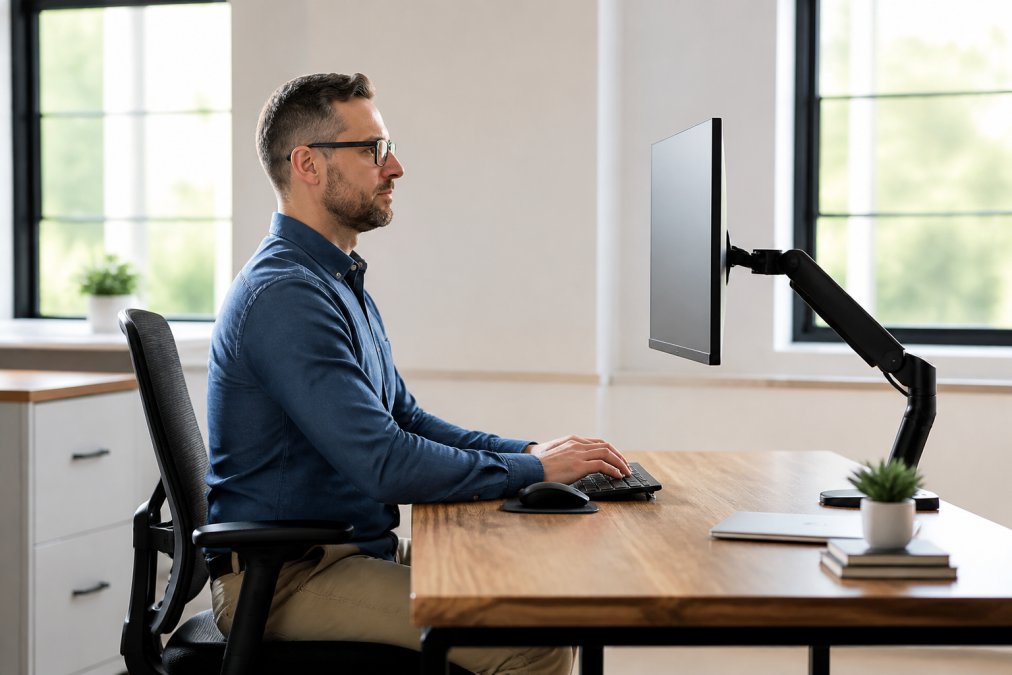
Here’s how to do it in five steps:
- Sit back in your chair with your back supported.
- Close your eyes, then open them. Your gaze should land near the top third of the screen.
- Raise or lower the monitor until it does.
- Check the distance: about 20 to 30 inches from your eyes.
- Tilt the screen back slightly so it faces your eyes, not your chest.
If you wear progressive lenses, you probably tilt your head back to see the screen. Lower the monitor an inch or two and you’ll stop craning.
Tech Neck Exercises to Relieve Pain
Tech neck exercises work best when matched to the problem. Forward head posture shortens muscles at the front and base of the neck while weakening the deep cervical flexors and mid-back. Stretching alone addresses half of that, so pair release work with activation work.
Phase 1: Release and Mobility
Do these first to reduce resting tension.
- Chin tucks: sit tall, pull your chin straight back (make a double chin, don’t nod down), hold 5 seconds, 10 reps. This activates the deep cervical flexors that hold your head over your shoulders.
- Upper trap stretch: tilt your ear toward your shoulder, use your hand for light overpressure, hold 20 to 30 seconds per side. Upper traps are usually tightest in desk workers.
- Levator scapulae stretch: turn your head 45 degrees, look down toward your armpit, hold 20 to 30 seconds per side. This targets the muscle from neck to shoulder blade, a common source of ache at the skull base.
- Neck rotations: turn slowly left, then right, 10 each way, stopping short of pain.
- Shoulder rolls: roll back 10 times, then forward 10 times to reset the shoulder girdle.
Phase 2: Activation and Strengthening
Once mobility improves, add these to build endurance for an eight-hour workday.
- Deep cervical flexor holds: lie on your back, tuck your chin, and lift your head about an inch off the floor. Hold 10 seconds, 10 reps. This is the single most evidence-supported exercise for chronic neck pain.
- Prone Y-T-W raises: lie face down, lift your arms into a Y, then a T, then a W, 10 reps each. This strengthens the mid and lower traps that hold your shoulders back.
- Thoracic extension over a chair: clasp your hands behind your head and gently arch back over the top of your chair, 10 slow reps. A stiff mid-back forces the neck to compensate.
- Wall angels: stand with your back against a wall, arms in a goalpost position, and slide them up and down while keeping contact, 10 reps.
How to Progress
Start with Phase 1 only for the first week. Add Phase 2 in week two. If an exercise causes sharp pain, numbness, or tingling down the arm, stop and see a clinician, that pattern suggests nerve involvement, not muscle tightness.
Set a recurring calendar reminder for mid-morning and mid-afternoon. The people who get better are the ones who do five minutes twice a day, not the ones who do thirty minutes once a week.
The Stress Connection Most Guides Skip
Chronic neck pain and stress feed each other: pain raises muscle guarding and anxiety, anxiety raises tension, and tension raises pain. That loop is why some people stretch diligently and still hurt. Two minutes of slow diaphragmatic breathing, in through the nose for four counts, out for six, before your stretch routine can lower the sympathetic drive that keeps your traps clenched.
The Importance of Frequent Breaks
Frequent breaks are the most underrated fix for neck pain, but most advice gets the reason wrong. It isn’t that sitting is bad and standing is good. It’s that static posture, even a good one, keeps the same muscle fibers contracted for hours, building metabolic waste and trigger points. That’s why your neck aches at 4 p.m. even with a perfect setup.
Two Kinds of Breaks (Most Guides Only Give You One)
Eye breaks reset your visual system and reduce the head-forward drift that follows tired eyes. Postural breaks change the load on your neck and shoulders. You need both.
- Every 20 minutes: look 20 feet away for 20 seconds. This is the 20-20-20 rule, and it’s an eye break, not a neck break.
- Every 30 to 45 minutes: stand up and move for one to two minutes. This is the postural break that actually unloads your cervical spine.
- Every 60 minutes: do one round of chin tucks and shoulder rolls before you sit back down.
The Micro-Break Protocol for People Who Can’t Leave the Desk
Call centers, surgeries, live chats, and back-to-back meetings don’t allow a walk every hour. If you can’t step away, change the load without leaving your chair:
- Chair push-ups: grip the armrests and press down to lift your seat slightly off the cushion, 5 reps. This decompresses the spine and fires the lats.
- Shoulder blade squeezes: pull your shoulder blades together and down, hold 5 seconds, 10 reps.
- Seated chin tucks: the same chin tuck from your exercise routine, done at your desk.
- Leg extensions: straighten one leg at a time under the desk to keep circulation moving.
- Weight shifts: alternate sitting fully back, then perching forward on your sit bones, every few minutes.
Build the Habit So It Actually Happens
- Set a timer or use a break reminder app that locks your screen briefly so you can’t ignore it.
- Anchor breaks to existing events: refilling water, hanging up a call, finishing a task.
- Stand during phone calls, this alone can add 30 to 60 minutes of standing to a workday.
- Keep a resistance band at your desk so a two-minute break has something to do.
- Pair the break with something you want, coffee, a stretch, a look out the window, so your brain stops treating it as punishment.
Skipping breaks and pushing through the ache is the fastest way to turn occasional soreness into chronic pain. Once pain lasts beyond a few weeks, it’s much harder to reverse, and the psychological toll, poor sleep, irritability, reduced focus, starts compounding the physical problem.
The Recovery Half Nobody Mentions
Breaks during the day only work if your neck also recovers at night. Eight hours undone by a pillow that pushes your head forward wastes the day’s progress. Match your pillow to your sleep position and treat sleep as the other half of your break strategy.
Mobile Device vs. Desktop: Different Protocols
Laptops and phones create different strain than a desktop, so they need different fixes. Work-from-home setups often mix all three, which is why pain shows up in new places.
For laptops:
- Use a riser and a separate keyboard
- Never work for hours with the laptop flat on your lap
- Keep the screen at eye level even if the keyboard sits lower
For phones and tablets:
- Hold the device up near eye level instead of bending your neck down
- Use voice dictation for long messages
- Take more breaks, since phone posture is worse than desk posture
Sleep Position Adjustments for Neck Pain
How you sleep decides whether your neck recovers overnight. Sleep position adjustments are the missing half of most neck pain plans.
- Back sleepers: use a thin pillow that supports the natural curve
- Side sleepers: use a pillow that fills the gap between ear and shoulder
- Stomach sleepers: this position twists the neck, so try to switch
Daytime posture and nighttime recovery work together. Fix your desk and your pillow, and most neck pain from computer work improves within a few weeks.
When to See a Doctor or Specialist
See a doctor if pain lasts more than two weeks, radiates into your arm, or comes with numbness, weakness, or tingling, signs of nerve involvement, not simple muscle strain.
Red flags that need prompt care:
- Pain after an accident or fall
- Loss of bladder or bowel control
- Severe headache with a stiff neck and fever
- Weakness or clumsiness in your hands
Frequently Asked Questions
Does tech neck ever go away?
Tech neck can improve with consistent changes to your workstation and daily habits. Adjusting your monitor to eye level, taking frequent breaks, and performing tech neck exercises regularly can reduce symptoms. If pain persists for more than a few weeks or worsens, consult a healthcare provider. Recovery depends on how long you’ve had symptoms and how consistently you apply ergonomic fixes.
Can you massage out tech neck pain?
Massage can temporarily relieve muscle tension in the neck and shoulders, but it does not correct the underlying posture issues that cause tech neck. For lasting relief, combine massage with an ergonomic desk setup for neck pain, regular stretching, and monitor height adjustments. Massage is best used as a complementary therapy alongside workplace modifications, not as a standalone fix.
What are the early signs of tech neck?
Early signs include stiffness in the neck or upper back, a dull ache at the base of the skull, and soreness after long computer sessions. You may also notice your head drifting forward when you’re tired. Addressing these symptoms early with better posture and workstation adjustments can prevent them from becoming chronic. Ignoring them often leads to more persistent pain and reduced range of motion.
How should a monitor be positioned to prevent neck strain?
Position your monitor so the top third of the screen is at or slightly below eye level, about an arm’s length away. This keeps your head neutral instead of tilted up or down. If you use a laptop, raise it on a stand and use an external keyboard and mouse. For dual monitors, place the primary screen directly in front of you and angle the second one inward to avoid twisting.
