Table of Contents
- Why Office Furniture Procurement Makes or Breaks a Startup Budget
- How to Build a Startup Office Furniture Budget That Holds Up
- The Office Furniture Checklist for Startups: What to Buy First
- Office Layout Planning for Startups: Work Zones, Flow, and Growth
- Used Office Furniture for Startups: Quality, Hygiene, and Brand Image
- A Step-by-Step Procurement Workflow for New Office Furniture
- Total Cost of Ownership: Looking Beyond the Purchase Price
- Conclusion: Furnishing a Startup Office Without Wasting Money
- Frequently Asked Questions
Last Updated: October 12, 2026
Why Office Furniture Procurement Makes or Breaks a Startup Budget
Office furniture procurement is the process of planning, sourcing, and buying desks, chairs, storage, and meeting room furniture for a workspace.
At Office Furniture Warehouse, we have spent more than 35 years helping small teams furnish offices without overspending.
This matters more than most founders expect. Furniture is one of the largest one-time costs of opening an office.
Below, we break down how to plan a budget, what to buy first, and where used pieces fit in.
How to Build a Startup Office Furniture Budget That Holds Up
Start with a per-workstation number, then adjust for your space, your growth plans, and how long you expect each piece to last. A startup office furniture budget is not a single line item, it is four cost buckets plus the costs that show up after the invoice.
A practical way to size your budget:
- Count workstations first. Every desk needs a chair, and every chair needs a home. Add a seat for every planned hire in the next 12 months, not just today’s headcount.
- Split fixed and flexible costs. Fixed items (desks, storage, task chairs) last years. Flexible items (cables, lamps, monitor arms, chair mats) get replaced or upgraded often.
- Separate one-time from recurring costs. Delivery, installation, and assembly are one-time. Maintenance, repairs, and replacement are recurring, and they are where cheap furniture quietly costs more.
A Per-Workstation Budget Model You Can Copy
Rather than guessing a lump sum, build your budget bottom-up per seat. Most practitioners find a workstation breaks into five components:
- Seating, one task chair per person, plus a spare for guests or a shared meeting room.
- Work surface, desk or benching, sized to the task (a 60×30-inch desk is a common baseline for a single monitor setup).
- Storage, a pedestal, filing cabinet, or locker per person, plus shared storage for the team.
- Power and cable management, trays, grommets, power strips, and monitor arms.
- Shared-space allocation, a per-person share of meeting tables, lounge seating, and reception furniture.
Multiply each component by your workstation count, then add delivery, installation, and the buffer. This model scales cleanly whether you are furnishing 5 seats or 50, and it makes it obvious which line item is driving your total.
Line Items Most Startups Forget to Include
These are the costs that blow up a startup office furniture budget:
- Delivery and installation fees, including after-hours or elevator-reservation surcharges
- Assembly tools and labor for pieces shipped flat
- Cable trays, grommets, and power strips
Skipping delivery and installation in your budget is the most common mistake we see. A team that plans for 15 workstations but forgets these fees can blow past their budget before a single desk is assembled. Ask every vendor for an itemized quote that separates product, freight, installation, and any disposal fees, a single bundled number hides the line that will surprise you.
How to Compare Quotes Without Getting Fooled
Unit price is the least useful number on a quote. When you put two or three vendor quotes side by side, normalize them on these fields before you decide:
- Specification match, same dimensions, same finish grade, same warranty tier. A cheaper quote often means a thinner laminate or a lower-grade cylinder.
- Lead time, in-stock versus made-to-order changes your move-in date and your storage costs.
- Warranty terms, years of coverage, what is excluded, and who pays return freight on a claim.
The vendor with the lowest unit price is rarely the cheapest overall. Delivery, installation, warranty coverage, and return terms decide the real cost, so compare quotes on those fields, not on the headline number.
The Office Furniture Checklist for Startups: What to Buy First
Buy in this order: chairs, desks, storage, then shared-space furniture. Chairs come first because people sit in them all day. A cheap chair costs you more in discomfort and replacements than a good one costs up front.
Here is a working office furniture checklist for startups, ranked by priority.
Essential Furniture vs. Nice-to-Have Pieces
Essential (buy these first):
- Ergonomic chairs with adjustable height and lumbar support
- Desks sized to your workstations
- Filing cabinets or storage for each team
- One meeting table with chairs
Nice-to-have (buy later):
- Lounge sofas and soft seating
- Decorative shelving
- Standing desk converters
- Branded signage and decor
| Priority | Item | Why It Matters | Buy When |
|---|---|---|---|
| 1 | Ergonomic chairs | Daily comfort and focus | Before day one |
| 2 | Desks | Core work surface | Before day one |
| 3 | Storage | Keeps desks clear | First month |
| 4 | Meeting table | Team collaboration | First month |
| 5 | Lounge seating | Client impressions | After 6 months |
Office Layout Planning for Startups: Work Zones, Flow, and Growth
Map your work zones before you buy anything, but plan them for the team you will have in 18 months, not the team you have today. Office layout planning for startups starts with four questions: how many people work here now, how many will work here in a year, how often are they actually in the office, and what kind of work happens where.
A simple zoning approach works for most small offices:
- Focus zones: desks for heads-down work, away from foot traffic
- Collaboration zones: meeting tables and whiteboards
- Break zones: kitchen or lounge area, kept separate from desks
- Storage zones: shared cabinets, not cluttering walkways
Natural light matters too. Put desks near windows and keep tall storage on interior walls.
Planning for Hybrid, Remote, and Hot-Desking Teams
Most competitors treat layout as a fixed-desk exercise. That assumption breaks the moment part of your team works from home. If your team is hybrid, you likely do not need one desk per employee, you need one desk per person expected on-site on a peak day, plus a buffer.
A common pattern is a desk-sharing ratio of roughly 1.5 to 2 employees per desk for teams that are in the office two or three days a week.
Design for hybrid with these moves:
- Standardize the desk. Identical desks and chairs make hot-desking frictionless, no one has to hunt for the one chair that fits them.
- Add lockers. Personal storage lets people leave a keyboard, headset, or notebook behind instead of hauling it home.
- Bookable rooms, not assigned offices. A small phone-booth or huddle room per 8 to 10 people absorbs video calls that would otherwise disrupt the focus zone.
- Mobile, modular pieces. Casters on storage, folding or nesting tables, and modular benching let you reconfigure a room in an afternoon instead of buying new furniture.
Growth-Ready Layout Rules
Leave room to grow. Teams that outgrow their layout in six months end up re-buying furniture. Plan for at least 20% more desks than you need today, and keep the following rules in mind:
- Keep aisles clear. A common guideline is a minimum 36-inch main walkway and roughly 30 inches between facing chairs so people can pass behind a seated coworker.
- Buy in a modular system. Benching and panel systems let you add a seat without replacing a whole row.
- Match finishes across phases. If you buy phase one in a discontinued color, phase two will never match, pick a line the manufacturer keeps in stock.
- Reserve one flexible room. A room that flips from training to lunch to overflow desks is cheaper than three single-purpose rooms.
Before you buy, walk your floor plan with a tape measure and mark desk footprints in painter’s tape. It takes an hour and catches the layout mistakes, blocked outlets, pinched walkways, a desk that will not fit through the door, that are expensive to fix after delivery.
Used Office Furniture for Startups: Quality, Hygiene, and Brand Image
Used office furniture for startups is often the smartest money-saving move, if you know how to check it.
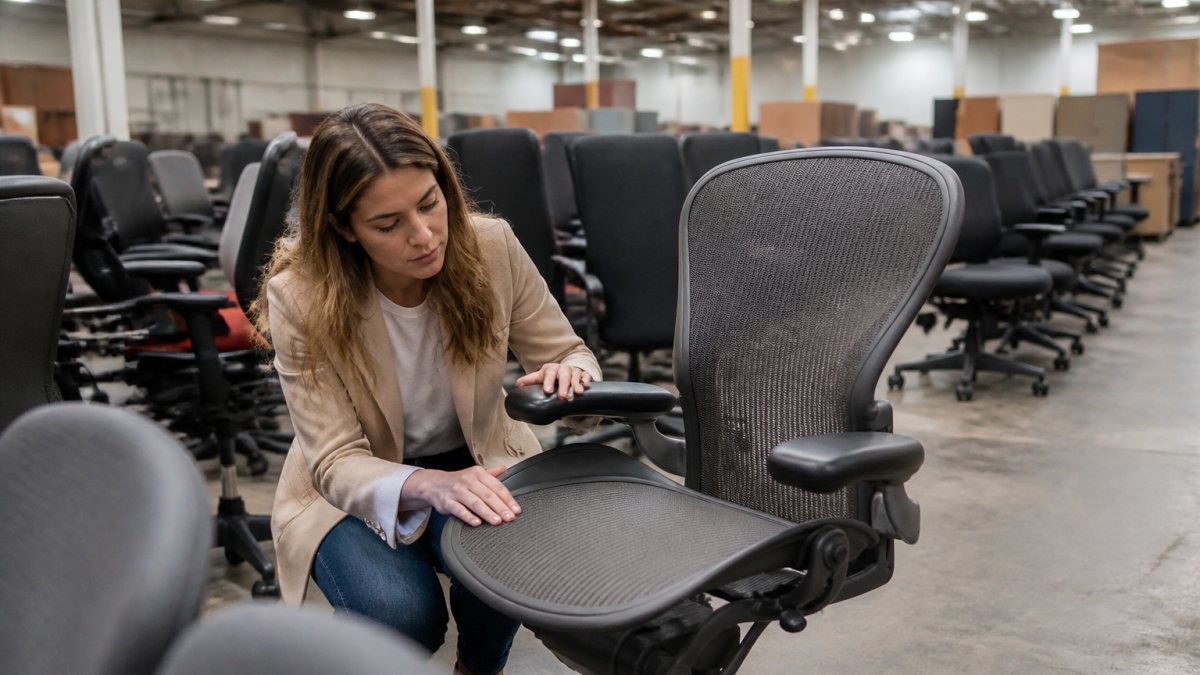
The concern we hear most is simple: will used furniture make our office look cheap? In practice, it usually does the opposite.
How to Evaluate Condition, Warranty, and Cleaning Standards
Check these before you buy any pre-owned piece:
- Frame and base: look for cracks, wobbles, or rust
- Upholstery: check for tears, stains, and sagging foam
- Mechanisms: test height adjustment, tilt, and armrest locks
- Warranty: ask what coverage comes with the piece
Ask about cleaning standards directly. Reputable sellers clean and inspect every item. If a seller cannot tell you how they prepare pre-owned furniture, walk away.
Buy pre-owned pieces in matched sets. A batch of identical chairs from one office decommission looks far more polished than ten different models, and it usually costs less per chair.
A Step-by-Step Procurement Workflow for New Office Furniture
Follow a fixed order of steps and you avoid most buying mistakes. Here is the workflow we recommend.
- Define your headcount and layout. Know how many desks and chairs you need.
- Set your budget. Include delivery, installation, and a buffer.
- Write your spec list. Note sizes, colors, and features you need.
- Get quotes from two or three vendors. Ask for itemized pricing.
- Compare total cost, not unit price. Delivery and install change the math.
- Check condition and warranty terms. Especially on pre-owned pieces.
- Confirm delivery and installation dates. Get them in writing.
- Inspect on arrival. Check every piece before signing off.
For vendors, ask three questions: How fast can you deliver? Who handles installation? What happens if a piece arrives damaged?
Total Cost of Ownership: Looking Beyond the Purchase Price
Total cost of ownership means the full cost of a piece over its life, not just what you pay at checkout.
Add these to your cost math:
- Purchase price: what you pay today
- Delivery and setup: one-time, but easy to forget
- Maintenance and repairs: higher on low-quality pieces
- Replacement cycle: cheaper items get replaced more often
Quality brands hold up better over time. That is why pre-owned Steelcase and Herman Miller pieces often deliver the best long-term value.
If you are planning for hybrid or remote teams, factor in flexibility. Adjustable desks and mobile storage let you reconfigure space as your team changes.
Conclusion: Furnishing a Startup Office Without Wasting Money
Furnishing a startup office on a tight budget takes planning, not luck. Set a clear budget, buy essentials first, and check condition carefully on any pre-owned piece.
At Office Furniture Warehouse, we make that easier. Our 4-acre inventory includes new and pre-owned furniture from top brands at up to 80% off.
Get started with Office Furniture Warehouse and furnish your startup office without wasting a dollar of runway. Visit our showroom today.
Frequently Asked Questions
How much should a startup budget for office furniture?
There is no single figure that fits every startup. Your budget depends on headcount, whether you buy new or pre-owned, and how many workstations you need. A practical approach is to allocate a per-workstation amount, then reserve 10-15% for delivery and installation. Buying pre-owned from a reputable dealer lets you fit premium brands like Steelcase or Herman Miller into that number at a fraction of retail cost. Request a quote based on your specific workstation count for accurate pricing.
Should startups buy new or used office furniture?
Used office furniture for startups often delivers the best value. Pre-owned pieces from quality brands hold up well, cost significantly less, and let you furnish more workstations within the same budget. The trade-off is limited color matching and occasional wear. New furniture gives you consistency and full warranty coverage but at a higher price. Many startups blend both: pre-owned desks and storage with new ergonomic chairs where comfort matters most.
What office furniture does a startup need first?
Start with the pieces people use every hour of the workday: desks, ergonomic chairs, and basic storage. After that, add meeting tables, guest seating, and filing cabinets as your team grows. An office furniture checklist for startups should rank items by daily use frequency, not by how they look in a photo. Prioritizing function first keeps your initial spend focused and leaves room in the budget for pieces you can add later.
How can startups choose furniture that will scale as the team grows?
Buy modular and adjustable furniture from the start. Desks with standard dimensions, stackable storage, and chairs with adjustable lumbar support work for a five-person team and a twenty-person team alike. When you standardize on one desk size and one chair model, adding workstations later is simple because matching inventory is easier to source. Used office furniture for startups is especially useful here, since large pre-owned inventories often include multiple matching units.
