Table of Contents
- Quick Comparison: 6 Best Office Chair Accessories for Comfort
- 1. Ergonomic Seat Cushion for Office Chair: Pressure Relief Where It Counts
- 2. Lumbar Support Pillows: The Foundation of Neutral Spine Alignment
- 3. Best Footrest for Under Desk: Fix Your Posture From the Ground Up
- 4. Adjustable Armrest Pads: Reducing Elbow and Forearm Strain
- 5. How to Fix Neck Pain From Computer Work: Monitor Arms and Blue Light Filters
- 6. Chair Mats and Rollerblade Casters: Mobility Meets Floor Protection
- How to Choose the Right Office Chair Accessories for Your Workspace
- Frequently Asked Questions
Last Updated: September 24, 2026
Quick Comparison: 6 Best Office Chair Accessories for Comfort
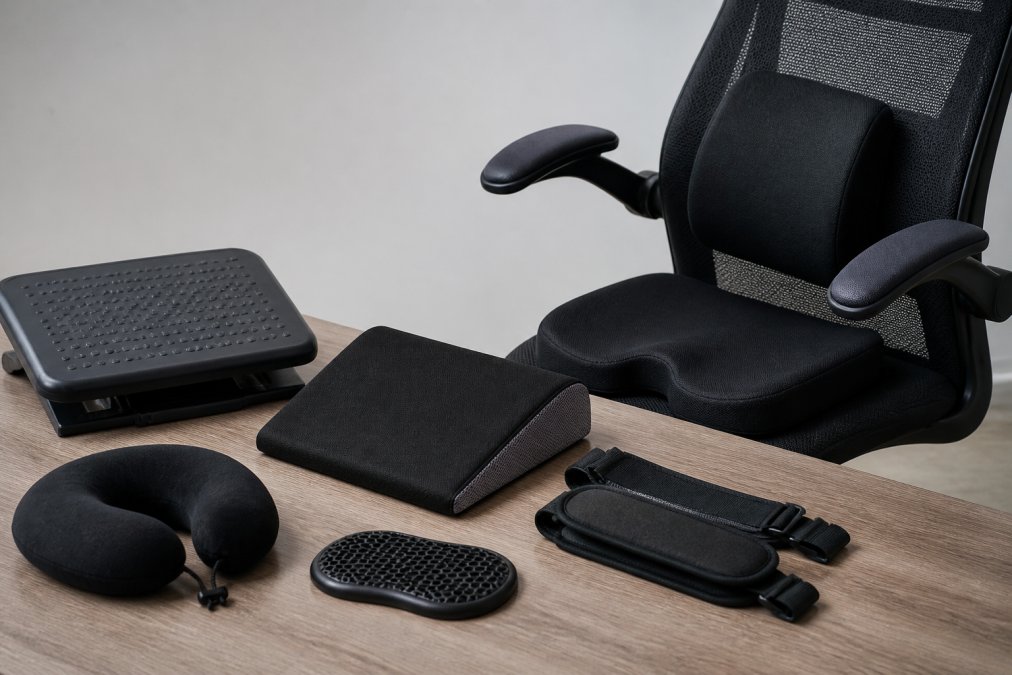
Office chair accessories are add-on components, cushions, and supports that improve the comfort, posture, and durability of an existing chair without replacing it. At Office Furniture Warehouse, we’ve spent more than 35 years helping companies and remote workers build workspaces that hold up over long days. This guide covers office chair accessories, what each one actually fixes, and how to match them to your body and your desk.
| Accessory | Fixes | Typical Price | Best For |
|---|---|---|---|
| Memory foam seat cushion | Tailbone and hip pressure | From $30 | Hard, flat seats |
| Lumbar support pillow | Lower back strain | From $20 | Chairs with weak lumbar support |
| Adjustable footrest | Leg fatigue, poor circulation | From $45 | Feet that don’t reach the floor |
| Armrest pads | Elbow and forearm pressure | From $25 | Hard plastic armrests |
| Monitor arm and blue light filter | Neck strain, eye fatigue | Varies | Laptop-only setups |
| Chair mat and rollerblade casters | Floor damage, stiff rolling | From $35 | Hardwood and tile floors |
The order matters. Fix your seat height and lumbar support first, then add foot and arm support. Accessories layered onto a badly adjusted chair rarely help.
1. Ergonomic Seat Cushion for Office Chair: Pressure Relief Where It Counts
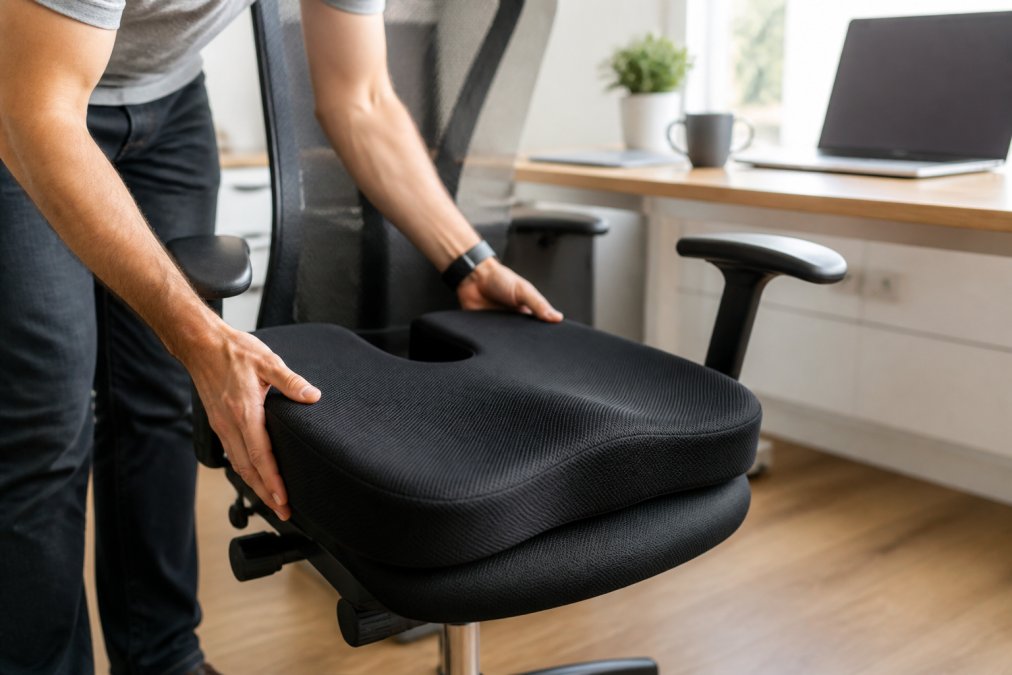
An ergonomic seat cushion for office chair use is the fastest fix for a seat that feels like a park bench by 2 p.m. An ergonomic seat cushion for office chair use is the fastest fix for a seat that feels like a park bench by 2 p.m. Many models use a pure memory foam core with a U-shaped cutout at the back, so your tailbone sits in open space instead of pressing into foam that has already given up.
2. Lumbar Support Pillows: The Foundation of Neutral Spine Alignment
A lumbar support pillow restores the inward curve of your lower back when a chair’s built-in support falls short. Contoured models strap onto the backrest and hold your spine in a neutral position rather than letting it slump into a C-shape.
3. Best Footrest for Under Desk: Fix Your Posture From the Ground Up
The best footrest for under desk use solves a problem most people never diagnose: a chair set high enough for your desk leaves your feet hanging. Many ergonomic footrests offer adjustable height settings and an angled surface that supports natural foot positioning, with a textured top to stop sliding.
4. Adjustable Armrest Pads: Reducing Elbow and Forearm Strain
Armrest pads are the cheapest upgrade on this list and the one people notice first. Many memory foam armrest pads use a high-density memory foam core under a breathable fabric cover, and the universal fit slides over most standard armrests without tools.
Measure before you buy
Universal fit is a marketing phrase, not a standard. Armrest pads fail for one reason: the pad is shorter, narrower, or flatter than the armrest it sits on. Before ordering, measure three dimensions with a tape measure:
- Length of the armrest top, front edge to back edge. Most pads run 9 to 11 inches; a pad shorter than your armrest leaves the front edge exposed, which is exactly where your forearm rests.
- Width across the top. Pads typically span 2.5 to 3.5 inches. A pad wider than the armrest overhangs and rolls; a narrower one slides side to side.
- Thickness you can tolerate. Adding more than about 1 inch of foam raises your elbows above the 90-degree position and pushes your shoulders up, which trades elbow pressure for neck strain.
Material matters more than the label
Memory foam pads feel plush on day one and compress where you load them. High-density foam holds its shape longer but feels firmer. Gel-infused foam runs cooler against the skin, which matters in a warm office, but the gel layer is thin and does not change how the pad fits. For a shared or hot-desking chair, look for a removable, washable cover, because fabric armrest pads collect skin oils and dust faster than any other accessory on this list.
Straps, adhesive, and the sliding problem
Most pads attach with hook-and-loop straps, elastic bands, or an adhesive backing. Straps are the most secure and the easiest to remove for cleaning. Adhesive pads can leave residue on textured or padded armrests and are effectively permanent once pressed down. If your armrests are curved or tapered, a flat pad will bridge the curve and rock; a contoured pad or one with a grippy underside is the better match.
Pads that don’t match your armrest shape will slide or bunch. Measure the length and width of your existing armrests before ordering, because non-standard shapes are the most common fit failure.
The DIY check
Before spending anything, test the position. Fold a hand towel to about half an inch thick, lay it over the armrest, and work for an hour. If your forearms feel better and your shoulders stay relaxed, a pad will help. If your elbows now sit too high, you need a thinner pad or an adjustable armrest, not more foam.
5. How to Fix Neck Pain From Computer Work: Monitor Arms and Blue Light Filters
How to fix neck pain from computer work starts with one measurement: the top third of your screen should sit at eye level. A monitor arm gets you there, and a blue light filter reduces the cervical strain and eye fatigue that build when you spend hours looking down and forward.
6. Chair Mats and Rollerblade Casters: Mobility Meets Floor Protection
Chair mats and replacement casters protect your floors and cut the effort of moving at your desk. A chair mat for hard floors uses a crack-resistant, transparent sheet with a non-slip backing, while office chair rollerblade casters swap your standard wheels for polyurethane-coated ones with an 11mm universal stem.
Match the mat to the floor, not the chair
Most buyers get this backward. The mat is chosen by floor surface first, because the wrong mat either slides, cracks, or sinks.
- Hard floors (hardwood, tile, laminate, vinyl). Use a smooth-backed, rigid mat, usually polycarbonate or a thick PVC. A studded or cleated backing is designed to grip carpet and will scratch a hard floor. Clear mats show the floor underneath; a tinted or textured mat hides scuffs better.
- Low-pile carpet. Use a mat with short cleats or studs that press into the pile. A flat-backed mat on carpet slides and wrinkles.
- Medium and high-pile carpet. Standard mats fail here. You need a thicker mat with longer cleats, or a chair with larger casters, because the mat will bridge and crack under a heavy chair.
- No mat at all. On a hard floor, a set of soft polyurethane casters can be enough on its own. The wheels roll quietly and won’t mark the finish, which is why many people skip the mat entirely once they upgrade casters.
Measure your caster stem before ordering
Replacement casters are sold as “universal,” but the stem diameter and length are what actually decide fit. Pull one caster out of your chair base and measure the metal stem:
- Diameter. Most office chairs use a 10mm or 11mm stem. A stem that is too thin wobbles in the socket; too thick and it won’t seat at all.
- Length and shape. Stems are either grip-ring (a friction ring holds them in) or threaded. Grip-ring is the common type on modern chairs. Threaded stems are found on some older models and need a matching threaded socket.
- Socket depth. If the stem is longer than the socket, the caster sits proud and the chair rocks.
Hard vs. soft casters
Standard hard plastic or nylon casters are built for carpet and roll poorly on hard floors, where they also scuff and transmit vibration. Soft polyurethane casters are the opposite: quiet and gentle on hard floors, but they drag on thick carpet. Match the wheel to the surface you actually roll on, and if you move between surfaces, soft casters are the safer default.
Maintenance and hygiene
Hair, dust, and carpet fibers wrap around the axle and are the main reason casters stop rolling smoothly. Pull each caster every few months and clear the axle with a pair of tweezers or a small pick. On the mat, wipe hard-floor mats with a damp cloth and mild soap; avoid abrasive cleaners and solvents, which cloud polycarbonate and make it brittle.
If you only buy one of these two, buy the casters. They cost less, install in minutes, and solve the rolling and floor-scratch problem on their own. Add the mat later if the floor still shows wear.
How to Choose the Right Office Chair Accessories for Your Workspace
Then check three things before you buy:
- Compatibility. Measure your armrests, caster stems, and seat depth. Universal fit covers most chairs, not all of them.
- Maintenance and hygiene. Foam cushions and fabric covers trap dust and sweat. Removable, washable covers matter more than most listings admit, especially on shared furniture.
- Material quality. Memory foam density determines how long a cushion holds its shape. Thin foam feels good for a month and flat by the third.
A DIY alternative works for the footrest: a sturdy box or a stack of books gets your feet to the right height for nothing. It won’t adjust or grip the floor, but it tells you whether foot elevation helps before you spend anything.
Budget matters, but used office furniture changes the math. Office Furniture Warehouse stocks new and pre-owned seating from brands like Steelcase and Herman Miller, with design guidance to help you match accessories to the chairs you already own. For teams furnishing multiple workstations, buying pre-owned pieces and adding targeted accessories costs far less than replacing every chair.
Frequently Asked Questions
What can I add to my office chair to make it more comfortable?
Start with an ergonomic seat cushion for office chair pressure relief, especially if you sit for more than four hours daily. A lumbar support pillow addresses lower back strain by maintaining your spine’s natural curve. If your feet dangle or your legs fatigue, the best footrest for under desk use elevates your knees to hip level, improving circulation. Armrest pads reduce elbow pressure, while rollerblade casters and a chair mat improve mobility. Together, these office chair accessories cost far less than a new chair and target the specific points where your body meets the seat.
What is the best office chair cushion for long hours of use?
Memory foam cushions with a U-shaped cutout work best for long sitting sessions because they relieve tailbone pressure while supporting weight distribution. Look for a non-slip base to keep the cushion from shifting, and a breathable fabric cover to reduce heat buildup. Cushion density matters: medium-firm foam holds its shape longer than soft foam, which flattens within months. If you experience tailbone pain or numbness after two hours, a contoured memory foam cushion is the most direct fix among office chair accessories.
How can I improve the ergonomics of my current office chair?
You can improve ergonomics without buying a new chair by layering accessories. Add a lumbar support pillow to reinforce your lower back, then adjust armrest elevation so your elbows rest at 90 degrees. A footrest brings your thighs parallel to the floor, which takes pressure off your spine. For neck strain, raise your monitor so the top third sits at eye level; a monitor arm makes this adjustment simple. Finally, swap standard casters for rollerblade wheels to reduce the effort of moving across carpet or hard floors.
Do lumbar support pillows actually help with back pain?
Lumbar support pillows help when your chair lacks built-in lumbar adjustment. They maintain the inward curve of your lower spine, which reduces strain on the muscles and discs that support your upper body. A contoured pillow with adjustable straps stays in position as you shift. One caveat: a pillow that is too thick pushes you forward in the seat, so choose a depth that lets your back rest naturally against it. Pairing a lumbar pillow with an ergonomic seat cushion for office chair support gives you both back and tailbone relief.
How do I stop neck pain from computer work?
Neck pain from computer work usually comes from looking down or leaning forward. Position your monitor so the top of the screen is at or slightly below eye level, about an arm’s length away. A monitor arm lets you adjust height and distance without stacking books. Keep your keyboard close so your elbows stay near your sides. If glare makes you lean in, a blue light filter or screen hood reduces cervical strain. Take a 30-second break every 30 minutes to reset your posture and prevent repetitive strain injury.
Most workspaces don’t need six accessories. They need the two or three that match a specific problem, fitted correctly and adjusted to your body. Office Furniture Warehouse can help you get there, with expert design and layout planning, a 4-acre inventory of new and pre-owned furniture, and flexible pickup or delivery options. Visit our showroom and let our team match the right accessories to your space and your budget.
