Last Updated: November 16, 2026
Quick Summary
A productive home office setup starts with four core pieces: a supportive chair, a desk at the right height, a monitor positioned at eye level, and lighting that reduces glare. Buy the chair and desk first, then build outward, because the order matters more than the products.
- Spend your money in priority order: chair, then desk, then monitor riser, then keyboard and mouse.
- A desk height of roughly 29 to 30 inches is a common starting point, but measure your seated elbow height first.
- Set the chair before the monitor to avoid raising the screen to compensate for a low seat.
- Keep the keyboard close so elbows stay near 90 degrees and place the mouse beside it, not across the desk.
- In small rooms, put the desk against the longest wall and use wall shelves above it.
Table of Contents
- Start With the Home Office Essentials List
- Build an Ergonomic Home Office Setup That Fits Your Body
- Desks and Chairs: The Two Purchases That Decide Your Comfort
- Monitors, Keyboards, and Mice That Reduce Strain
- Work From Home Setup Accessories Worth Buying
- Home Office Setup Ideas for Small Spaces and Shared Rooms
- Lighting, Audio, and Video Call Equipment
- Plan Your Purchase With Office Furniture Warehouse
- Frequently Asked Questions
Start With the Home Office Essentials List
A productive home office setup starts with four core pieces: a supportive chair, a desk at the right height, a monitor positioned at eye level, and lighting that reduces glare. Everything else is optional. At Office Furniture Warehouse, we have spent more than 35 years helping people furnish workspaces, and comfort comes first, style comes second.
The essential home office essentials list looks like this:
- Ergonomic chair with lumbar support
- Desk sized to your space and work style
- Monitor stand or laptop riser
- Separate keyboard and mouse
- Task lighting
- Cable management and a power strip
What most guides miss is that the order matters more than the products. Buy the chair and desk first, then build outward.
What to Buy First on a Tight Budget
Spend your money in priority order: chair, then desk, then monitor riser, then keyboard and mouse. A cheap chair under a good desk still leaves you sore by Thursday.
Secondhand is worth considering here. If you want a full plan, our guide on how to set up an ergonomic home office on a budget walks through it step by step.
Build an Ergonomic Home Office Setup That Fits Your Body
An ergonomic home office setup is one adjusted to your measurements, not copied from a photo. The goal is neutral posture: feet supported, knees and hips near 90 degrees, elbows close to your sides, wrists straight, and the top third of the screen at eye level.
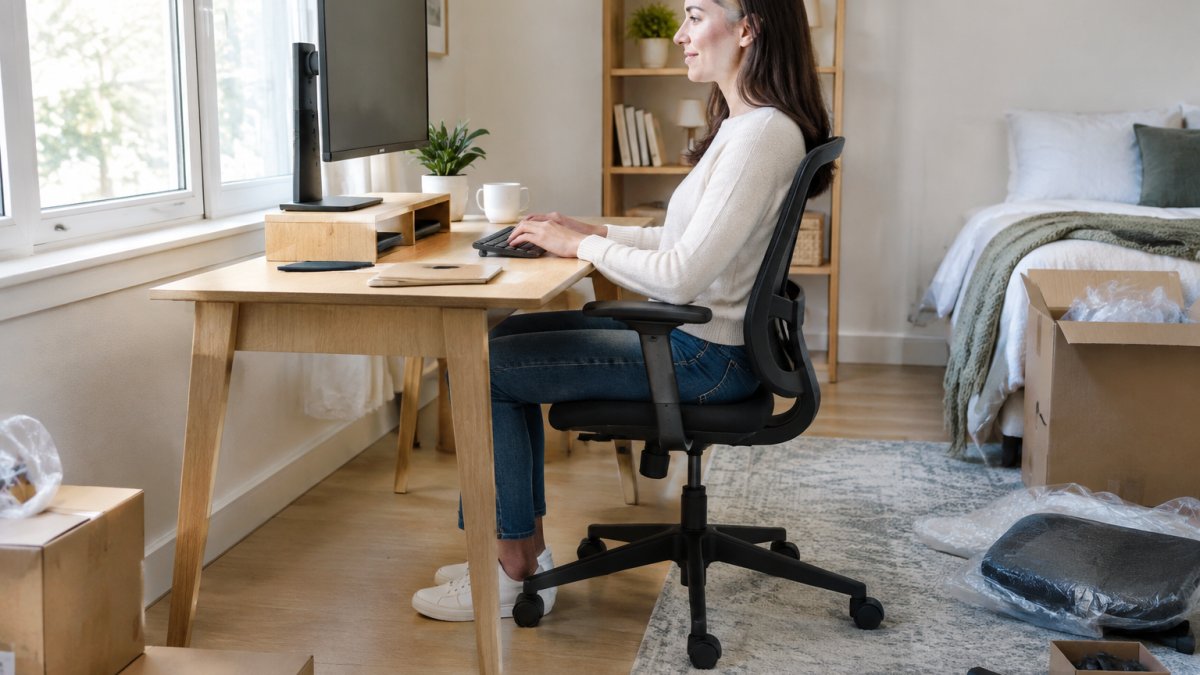
The woman is American.
Measure Before You Adjust
You need three numbers: your seated elbow height, your seated eye height, and your popliteal height (the floor-to-underside-of-knee distance). Sit in the chair you plan to use, feet flat, and measure with a tape or a helper. A desk height of roughly 29 to 30 inches is a common starting point, but the right height depends on your seated elbow height, so measure before choosing.
Set the Chair First
- Set seat height so your feet rest flat and your knees sit at roughly 90 degrees. If the desk is then too high, raise the chair and add a footrest; if the desk is too low, raise the desk or switch to an adjustable model.
- Set seat depth so two to three fingers fit between the back of your knee and the seat edge. A seat that presses behind the knee restricts circulation.
- Set lumbar support to the small of your back, roughly at belt height, and set backrest angle slightly reclined, around 100 to 110 degrees is a common target, rather than bolt upright.
- Set armrests so your shoulders relax and your elbows rest near 90 degrees. If armrests prevent you from pulling close to the desk, move them out of the way or remove them.
Watch out: adjusting the monitor before the chair is set is the most common sequencing error, you end up raising the screen to compensate for a seat that is too low, and the neck strain returns as soon as you change posture.
Position the Monitor and Inputs
With the chair set, bring the monitor forward so the screen sits about an arm’s length away, and raise it until the top third of the screen is level with your eyes. If you wear progressive lenses, you may need the screen lower so you view it through the correct part of the lens. Keep the keyboard close enough that your elbows stay bent near 90 degrees and your wrists stay flat, a slight negative tilt (front edge lower) helps if your wrists tend to bend upward.
Fit Adjustments for Different Bodies
If you share the workspace, record your settings, many adjustable chairs and desks have numbered or marked positions, so each person can return to their fit in seconds. Our ergonomic office furniture setup guide walks through the full measurement and adjustment sequence.
Desks and Chairs: The Two Purchases That Decide Your Comfort
The chair and desk decide whether you can work eight hours without pain. Everything else is a refinement.
| Option | Best For | Trade-off |
|---|---|---|
| Adjustable desk | Mixed sitting and standing | Costs more, needs floor space |
| Fixed desk | Tight budgets, small rooms | No height flexibility |
| Task chair with lumbar support | Long work sessions | Takes up more room |
| Space-saving folding desk | Temporary or shared rooms | Less stable, smaller surface |
An adjustable desk lets you alternate posture through the day. A fixed desk works if the height matches your body. For chairs, prioritize adjustable seat height, lumbar support, and armrests you can move out of the way.
Monitors, Keyboards, and Mice That Reduce Strain
Strain comes from reaching, not from typing. Keep the keyboard close enough that your elbows stay bent near 90 degrees, and keep the mouse beside it, not across the desk.
A monitor stand or laptop riser brings the screen to eye level and frees desk space underneath. If you run two screens, our guide on how to set up dual monitors ergonomically explains the angle and spacing that keep your neck neutral.
Look for a keyboard with a slight negative tilt and a mouse that fits your hand size. Wrist support helps, but position matters more than padding.
Work From Home Setup Accessories Worth Buying
Accessories earn their place only if they solve a daily annoyance. The useful way to think about them is in tiers: essentials that fix a real problem now, upgrades that improve an already-working setup, and skips that add cost without changing how you work. Buy in that order and you avoid the common pattern of spending on decoration before the core setup is right.
Tier 1: Essentials That Fix a Daily Problem
- Surge-protecting power strip with a single switch: one switch for the whole desk, and protection for the equipment. Look for a UL-listed strip with a joule rating appropriate to your devices; a plain extension cord is not a substitute.
- USB hub: fewer cables and faster connections if your laptop has few ports. Match the hub to your ports, USB-C with Power Delivery if you charge through it, USB-A if your peripherals are older.
- Cable management: clips, sleeves, or a tray under the desk. This is the cheapest upgrade with the largest visible effect on how the workspace feels.
Tier 2: Upgrades Worth Considering Once the Core Works
- Desk mat: protects the surface and defines the work zone, but only after the desk height is right.
- Shelving or a filing cabinet: gets paper off the desk and into reach. A rolling cabinet doubles as a side table in shared rooms.
- Monitor arm: frees desk space and makes height adjustment easier than a fixed stand, but costs more and requires a compatible desk edge or grommet.
Tier 3: Skip Until Everything Else Is Settled
Decorative extras, matching desk sets, and heavily styled organizers tend to add cost without changing how you work. Clutter returns faster than you expect, and a minimalist setup is easier to maintain than a heavily styled one. If you are furnishing on a tight budget, put the money into the chair and desk first, the accessories in Tier 1 are inexpensive and can wait a pay period.
A Buying Sequence That Avoids Waste
A practical order for most people: chair, desk, monitor riser or stand, separate keyboard and mouse, then Tier 1 accessories, then Tier 2 upgrades as specific annoyances appear. If you are starting from nothing, this sequence keeps you from buying a desk mat and a monitor arm before you own a chair that fits. Once the essentials are in place, stylish home office essentials can add comfort and visual cohesion without displacing the ergonomic priorities that make the setup work.
Home Office Setup Ideas for Small Spaces and Shared Rooms
Small rooms reward vertical storage and furniture that folds or rolls away. Put the desk against the longest wall, use wall shelves above it, and choose a chair you can tuck fully under the desk when the workday ends.
For shared rooms, define the workspace with a rug or a screen so the room switches purpose cleanly. Our step-by-step guide on how to organize a compact home office covers layout, storage, and cable routing in tight rooms.
Lighting, Audio, and Video Call Equipment
Light your face, not your screen. Put a task lamp to the side of the monitor rather than behind it, and angle the screen away from windows to cut glare.
Headphones with a boom mic handle calls without echo. Our article on optimizing office lighting for employee wellness explains how to balance natural light and desk lamps without washing out your camera image.
Plan Your Purchase With Office Furniture Warehouse
The setup that lasts is the one bought in the right order and fitted to your body, not the one with the longest equipment list.
At Office Furniture Warehouse, we stock new and pre-owned furniture across a 4-acre inventory, including Steelcase and Herman Miller pieces.
Get started with Office Furniture Warehouse and build a workspace that supports you from the first hour to the last.
Frequently Asked Questions
What do you need for a productive home office setup?
The core items are a desk at the right height, an ergonomic chair with lumbar support, a monitor or laptop riser at eye level, and a keyboard and mouse positioned so your wrists stay neutral. Add task lighting, a webcam and microphone for calls, and cable management to keep the surface clear. Start with the desk and chair, since those two decide your posture for every working hour, then add accessories as your budget allows.
What home office equipment should I buy first on a budget?
Buy in this order: an ergonomic chair, then a desk you can adjust to the right height, then a laptop riser or monitor stand, then a separate keyboard and mouse. These four fix posture and strain, which is where most discomfort comes from. Lighting, webcams, and desk organizers can wait. Pre-owned office furniture from brands like Steelcase and Herman Miller is available at Office Furniture Warehouse; pricing depends on the item and your order, so check our website or request a quote.
How should I choose an ergonomic chair for a home office?
Look for adjustable seat height, adjustable lumbar support, and a seat depth that leaves two to three inches between the back of your knees and the seat edge. Armrests should adjust so your shoulders stay relaxed. Test the chair in person if you can. A chair that fits your body beats a more expensive one that does not.
How can I make a small home office more productive?
Use vertical space with shelving above the desk, pick a space-saving or wall-mounted desk, and keep only frequently used supplies within reach. A monitor arm frees desk surface, and a rolling filing cabinet stores paperwork out of sight. If the room is shared, a folding desk and noise-canceling headphones let you pack up quickly. Clear surfaces reduce visual clutter, which helps you start work faster each morning.
How can I reduce distractions in my home office?
Separate work from home life with a defined workspace, even a corner of a room. Use headphones for focus blocks, silence phone notifications during deep work, and keep the desk clear of non-work items. Position the desk so you face away from doorways and TVs where possible. A consistent start time and a short shutdown routine at the end of the day also make it easier to switch off.

