Table of Contents
- Why Ergonomic Chairs Matter for Office Staff
- Essential Features of Ergonomic Office Chairs
- Ergonomic Chair Adjustment Guide for Proper Posture
- Benefits of Ergonomic Office Furniture for Employee Health
- How to Set Up an Ergonomic Workstation
- Choosing Chairs for Different Body Types and Work Styles
- Long-Term Maintenance and Care of Ergonomic Seating
- Budget Considerations and Getting Quality at Every Price Point
- Frequently Asked Questions
Last Updated: September 3, 2026
Why Ergonomic Chairs Matter for Office Staff
Choosing ergonomic chairs for office staff isn’t a luxury, it’s essential for productivity and health. When employees spend 8+ hours daily seated, the chair becomes their most critical workstation component (the CDC). Poor seating leads to back pain, neck strain, and repetitive stress injuries that reduce focus and increase absenteeism. The right ergonomic chair redistributes pressure, supports spinal alignment, and reduces musculoskeletal strain.
At Office Furniture Warehouse, we understand how furniture choices impact workplace culture. The difference between a basic office chair and a proper ergonomic task chair shows up in employee retention, healthcare costs, and daily performance.
The challenge most facility managers face is knowing what features actually matter versus marketing hype. Below, we’ll walk through essential features of ergonomic office chairs, how to set up a workstation correctly, and how to match chairs to different body types and budgets.
Essential Features of Ergonomic Office Chairs
Not all office chairs are created equal. True ergonomic task chairs feature specific design elements that support your spine, distribute weight evenly, and allow personalized adjustment.
Lumbar Support and Backrest Design
The lumbar spine curves inward naturally; your lower back isn’t flat. A chair without proper lumbar support forces your spine into an unnatural position, causing lower back muscles to work overtime, where back pain starts.
Effective lumbar support fills the gap between your lower back and the backrest and is adjustable so different body types can dial in the right level. The best ergonomic office chairs include adjustable lumbar support that moves up, down, and forward/backward to match your spine’s natural curve.
Look for a backrest extending at least to your mid-back (thoracic spine) with a reclinable angle. A backrest locked in one position forces static posture, a major contributor to musculoskeletal fatigue.
Adjustable Seat Height and Seat Depth
Your feet should rest flat on the floor with knees at 90 degrees. Pneumatic height adjustment lets you fine-tune seat height in small increments, the difference between a 17-inch and 18-inch seat height can mean comfort versus strain depending on your height.
Seat depth is equally important. Your seat pan should support your thighs without pressing into the back of your knees. A seat too deep forces you to sit too far back (losing lumbar support) or perch on the edge (losing thigh support). Standard seat depth ranges from 16 to 18 inches, though premium ergonomic chairs offer adjustable depth or multiple size options.
Armrest Adjustability and Tilt Tension
Armrests prevent shoulder strain by supporting your arms at approximately 90 degrees, with forearms parallel to the desk. This requires armrests that adjust in height and width. Fixed armrests are nearly useless, they either sit too high (forcing shoulders up) or too low (offering no support).
The best ergonomic office chairs include 3D adjustable armrests: height, width, and angle. Tilt tension should offer smooth, gradual resistance, not sudden locking or free-fall. Look for chairs with tilt-tension adjustment knobs that let each user dial in their preference. Dynamic seating, where you can shift between reclined and upright throughout the day, reduces pressure points and keeps muscles engaged.
Ergonomic Chair Adjustment Guide for Proper Posture
Having the right chair means nothing if adjusted incorrectly. Most employees never adjust their chairs beyond initial height. Here’s how to set up an ergonomic office chair properly:
Seat Height: Adjust so your feet rest flat on the floor with knees at 90 degrees and thighs parallel to the floor.
Lumbar Support: Position the lumbar curve to match your lower back’s natural inward curve. You should feel gentle support, not pressure.
Backrest Recline: Adjust so your spine feels supported in natural posture. Most people find 100-110 degrees (slightly reclined from upright) most comfortable for long periods.
Armrest Height: Position armrests so your elbows rest at 90 degrees with shoulders relaxed. Your forearms should rest lightly without bearing full arm weight.
Seat Depth: Sit all the way back so your back contacts the backrest. There should be 2-3 inches of space between the front edge of the seat pan and the back of your knees.
Tilt Tension: Adjust so the chair reclines smoothly. You should be able to shift between positions throughout the day without fighting the mechanism.
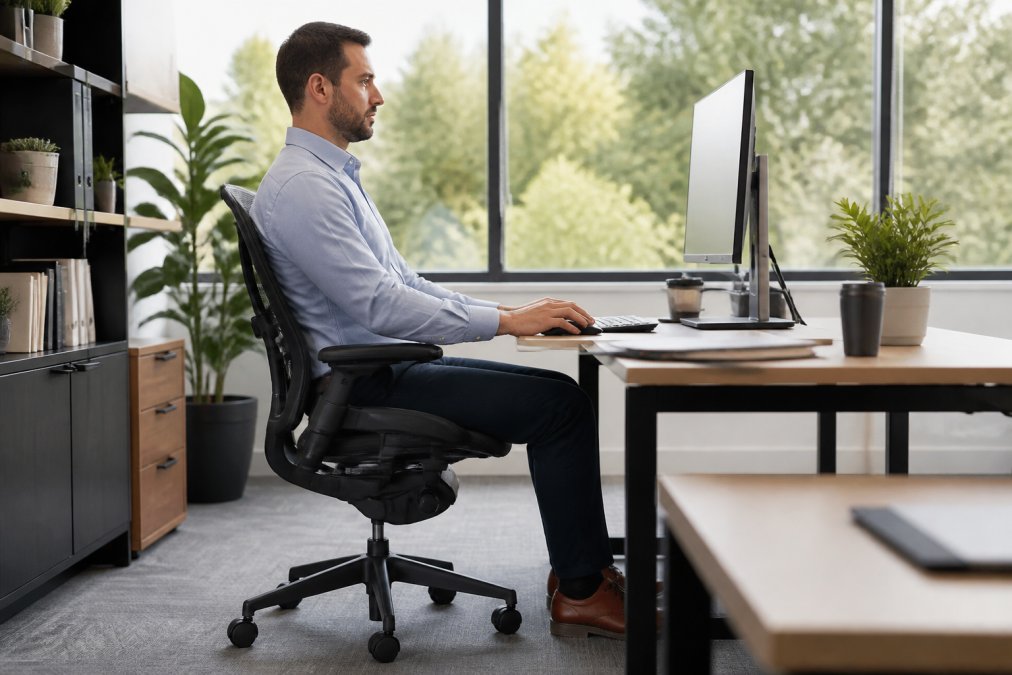
These adjustments aren’t one-time settings. As you move throughout the day, your posture naturally shifts. A good ergonomic chair accommodates this dynamic movement.
Benefits of Ergonomic Office Furniture for Employee Health
The investment in choosing ergonomic chairs for office staff pays dividends in employee health and workplace performance. Back pain is the leading cause of workplace disability (the CDC). A well-designed ergonomic chair supports your spine in natural alignment, reducing the muscular effort required to maintain posture. Over an 8-hour workday, this compounds, your back muscles fatigue less, inflammation decreases, and pain subsides.
Neck and shoulder strain follow similar patterns. Proper lumbar support and backrest design keep your entire spine aligned, reducing compensatory strain. Ergonomic seating also reduces repetitive strain injuries by supporting your body in neutral positions, allowing muscles to work efficiently rather than fighting poor alignment.
The psychological benefit matters too. Employees comfortable in their chairs report higher job satisfaction and lower stress levels. Discomfort is a constant distraction; removing it eliminates a hidden productivity drain.
How to Set Up an Ergonomic Workstation
A great ergonomic chair is only one piece of the puzzle. The entire workstation setup determines whether the chair can do its job.
Monitor Placement: Position your monitor 20-26 inches from your eyes with the top of the screen at or slightly below eye level (osha.gov). Your eyes should naturally gaze downward at about 15 degrees.
Desk Height: Your desk should be high enough that your elbows rest at approximately 90 degrees when your arms are at your sides. Standard desk height is 30 inches, but taller employees may need a higher desk or keyboard tray.
Keyboard and Mouse: Position your keyboard directly in front of you at elbow height. Your mouse should be at the same height and close to your keyboard.
Footrest: If your feet don’t rest flat on the floor, use a footrest to prevent leg dangling and reduce pressure on the back of your thighs.
Document Holder: Position documents between your keyboard and monitor at the same distance from your eyes as your screen to reduce neck strain.
When everything aligns, your ergonomic chair can support you without strain.
Choosing Chairs for Different Body Types and Work Styles
One ergonomic chair doesn’t fit everyone. Body type, height, and work style all influence which chair design works best.
For Taller Employees (6’2″ and above): Look for chairs with extended seat height ranges (up to 22-23 inches) and taller backrests that support the upper back. Armrest width should be adjustable for larger frames.
For Shorter Employees (5’4″ and below): Seek chairs with lower minimum seat heights (around 16 inches). A footrest becomes essential to keep feet flat and supported.
For Heavier Employees: Weight capacity is critical. Standard office chairs typically support 250-300 pounds. For heavier employees, seek chairs rated for 400+ pounds with reinforced bases and stronger gas cylinders.
For Employees with Existing Back Pain: Prioritize adjustable lumbar support and a reclinable backrest. The ability to shift positions throughout the day is more important than any single feature.
For Employees Switching Between Sitting and Standing: Your chair needs a wide seat height range and strong tilt mechanism to accommodate both positions.
For High-Mobility Roles: Employees who move between workstations need a chair that’s easy to adjust. Swivel base quality and caster wheel smoothness matter more than for stationary workers.
Matching the chair’s adjustability range and design to the employee’s actual body and work pattern ensures everyone gets proper support.
Long-Term Maintenance and Care of Ergonomic Seating
A quality ergonomic chair is an investment. Proper maintenance extends its lifespan and keeps it functioning as designed.
Cleaning: Vacuum mesh seats monthly to prevent dust buildup. For fabric seats, spot-clean spills immediately. Wipe down plastic components and metal bases with a damp cloth. For leather or vinyl seats, use appropriate leather cleaner.
Mechanism Maintenance: Tilt mechanisms, height adjustment cylinders, and armrest pivots benefit from occasional light lubrication. A small amount of machine oil or silicone spray on moving joints keeps them smooth.
Caster Wheels and Swivel Base: Clean wheels monthly with a damp cloth or brush to remove hair and debris. If wheels become stuck or squeaky, light lubrication helps.
Upholstery Care: Mesh seats require regular vacuuming. Fabric seats benefit from occasional vacuuming and spot-cleaning. Leather requires conditioning every 6-12 months.
Inspection: Periodically check for loose bolts, worn cushioning, or damaged fabric. Tighten bolts if they loosen over time.
Quality ergonomic chairs from manufacturers like Steelcase and Herman Miller last 10+ years with proper care. Neglected chairs fail in 3-5 years.
Budget Considerations and Getting Quality at Every Price Point
Ergonomic chairs range from $200 to $2,000+. Price reflects material durability and adjustability sophistication.
Budget Tier: These chairs offer basic ergonomic features: adjustable height, lumbar support, and tilt mechanism. For light-use environments, they work. For full-time employees, they fall short.
Mid-Range Tier: This is where most quality ergonomic chairs live. Better materials, smoother mechanisms, and more adjustability. These chairs handle 8-hour workdays well and last 7-10 years with proper care.
Premium Tier: Premium chairs offer maximum adjustability, premium materials, and refined mechanisms. Durability extends to 10+ years.
Office Furniture Warehouse stocks new and pre-owned options across various price tiers, including premium brands like Steelcase and Herman Miller at significant discounts. Pre-owned chairs from premium manufacturers often offer better value than new budget chairs.
Consider total cost of ownership. For organizations outfitting multiple workstations, Office Furniture Warehouse offers design consultation and bulk pricing. With over 35 years of experience and a 4-acre inventory, we can source the exact combination of chairs and workstations your organization needs.
Choosing ergonomic chairs for office staff requires balancing comfort, durability, adjustability, and budget. The right chair supports your spine, allows personalized adjustment, and lasts years with proper care. Match chairs to your employees’ body types and work patterns rather than buying one model for everyone. Office Furniture Warehouse can guide you through the selection process, offering premium brands at accessible prices and expert advice on workstation setup. Visit our showroom today to test chairs and discuss your organization’s specific requirements.
=== FAQ ANSWERS (audit these too, same rules) ===
[1] Q: How do I pick an ergonomic office chair that fits my body type?
A: Start with seat depth and width that match your frame, your back should touch the backrest with 2-3 inches of space between the seat edge and your knees. Adjust lumbar support to match your spine’s natural curve, and set seat height so your feet rest flat on the floor with knees at 90 degrees. Test recline tension and armrest height to ensure they support your arms without forcing your shoulders up. Different body types need different adjustments, so spend time fine-tuning each feature before committing to a purchase.
[2] Q: What are the essential features of an ergonomic office chair?
A: Look for adjustable pneumatic height adjustment, lumbar support that moves independently, tilt tension controls, armrest width adjustment, breathable mesh or cushioned upholstery, a swivel base with smooth caster wheels, and a seat pan deep enough to support your thighs without pressure at the edges. Weight capacity should match or exceed your needs, and the chair should allow pelvic tilt to support dynamic seating throughout the day. These features work together to reduce repetitive strain injury and support spinal alignment during long work hours.
[3] Q: How does ergonomic furniture impact employee productivity and health?
A: Ergonomic chairs reduce musculoskeletal strain and back pain, allowing staff to focus on work rather than discomfort. Better posture correction improves circulation and reduces fatigue, leading to fewer sick days and higher concentration. Proper pressure distribution across the seat pan and lumbar support prevents repetitive strain injuries that can sideline employees for weeks. Investing in ergonomic office furniture can improve employee retention and reduce healthcare costs, making it a smart long-term investment for any organization.
[4] Q: Can I use an ergonomic chair with a standing desk setup?
A: Yes, in fact, pairing an ergonomic task chair with a standing desk creates a dynamic workstation that supports both sitting and standing positions. When using a chair with a standing desk, ensure the seat height adjusts to match your desk height when seated, and use a footrest when standing to reduce leg strain. This combination allows staff to alternate positions throughout the day, improving circulation and reducing the fatigue that comes from staying in one posture for too long.
[5] Q: How should I clean and maintain pre-owned ergonomic office chairs?
A: Vacuum mesh upholstery weekly to remove dust and debris. For stains on fabric, use a mild soap solution and damp cloth, then air dry completely. Check pneumatic cylinders and tilt mechanisms monthly to ensure smooth operation, and tighten any loose bolts. Inspect caster wheels for hair or buildup and clean as needed. For long-term durability, rotate the chair periodically to distribute wear evenly, and avoid exposing it to direct sunlight which can fade and degrade materials over time.
[6] Q: What should I look for when buying office chairs in bulk for my team?
A: Prioritize consistency in features across all chairs so your team has the same adjustment capabilities and support standards. Verify that the chairs accommodate your staff’s range of body types and sizes, check weight capacity and seat dimensions carefully. Consider breathable mesh materials if your office runs warm, and choose a neutral color that works with your décor. Request bulk pricing and confirm delivery timelines upfront. Working with an experienced furniture provider who stocks quality brands ensures you get professional-grade seating that will last years, not months.
Frequently Asked Questions
How do I pick an ergonomic office chair that fits my body type?
Start with seat depth and width that match your frame, your back should touch the backrest with 2-3 inches of space between the seat edge and your knees. Adjust lumbar support to match your spine’s natural curve, and set seat height so your feet rest flat on the floor with knees at 90 degrees. Test recline tension and armrest height to ensure they support your arms without forcing your shoulders up. Different body types need different adjustments, so spend time fine-tuning each feature before committing to a purchase.
What are the essential features of an ergonomic office chair?
Look for adjustable pneumatic height adjustment, lumbar support that moves independently, tilt tension controls, armrest width adjustment, breathable mesh or cushioned upholstery, a swivel base with smooth caster wheels, and a seat pan deep enough to support your thighs without pressure at the edges. Weight capacity should match or exceed your needs, and the chair should allow pelvic tilt to support dynamic seating throughout the day. These features work together to reduce repetitive strain injury and support spinal alignment during long work hours.
How does ergonomic furniture impact employee productivity and health?
Ergonomic chairs reduce musculoskeletal strain and back pain, allowing staff to focus on work rather than discomfort. Better posture correction improves circulation and reduces fatigue, leading to fewer sick days and higher concentration. Proper pressure distribution across the seat pan and lumbar support prevents repetitive strain injuries that can sideline employees for weeks. Investing in ergonomic office furniture can improve employee retention and reduce healthcare costs, making it a smart long-term investment for any organization.
Can I use an ergonomic chair with a standing desk setup?
Yes, in fact, pairing an ergonomic task chair with a standing desk creates a dynamic workstation that supports both sitting and standing positions. When using a chair with a standing desk, ensure the seat height adjusts to match your desk height when seated, and use a footrest when standing to reduce leg strain. This combination allows staff to alternate positions throughout the day, improving circulation and reducing the fatigue that comes from staying in one posture for too long.
How should I clean and maintain pre-owned ergonomic office chairs?
Vacuum mesh upholstery weekly to remove dust and debris. For stains on fabric, use a mild soap solution and damp cloth, then air dry completely. Check pneumatic cylinders and tilt mechanisms monthly to ensure smooth operation, and tighten any loose bolts. Inspect caster wheels for hair or buildup and clean as needed. For long-term durability, rotate the chair periodically to distribute wear evenly, and avoid exposing it to direct sunlight which can fade and degrade materials over time.
What should I look for when buying office chairs in bulk for my team?
Prioritize consistency in features across all chairs so your team has the same adjustment capabilities and support standards. Verify that the chairs accommodate your staff’s range of body types and sizes, check weight capacity and seat dimensions carefully. Consider breathable mesh materials if your office runs warm, and choose a neutral color that works with your décor. Request bulk pricing and confirm delivery timelines upfront. Working with an experienced furniture provider who stocks quality brands ensures you get professional-grade seating that will last years, not months.
This article was written using GrandRanker
