Table of Contents
- Why Ergonomic Furniture Matters for Remote Employees
- Health Improvements Remote Workers Can Expect
- How Ergonomics Boosts Productivity at Home
- Building an Ergonomic Desk Setup for Remote Work
- Best Ergonomic Chairs for Remote Workers
- Cost-Effectiveness: Ergonomic Office Furniture Buying Guide
- Using a Remote Employee Home Office Stipend Wisely
- Conclusion
- Frequently Asked Questions
Last Updated: October 17, 2026
Why Ergonomic Furniture Matters for Remote Employees
Remote work removed the commute, but it also removed the adjustable chair, the properly sized desk, and the monitor stand that came with the office. Ergonomic furniture is equipment designed to fit the worker’s body and task rather than forcing the body to adapt to the furniture, and for remote employees it closes that gap. At Office Furniture Warehouse, we have spent more than 35 years watching companies furnish offices, and the home setups we see now repeat the same mistakes: kitchen tables used as desks, laptops propped on stacks of books, dining chairs sat in for eight hours straight. The benefits of ergonomic furniture for remote employees start with the obvious, comfort and fewer aches, but they extend into focus, stamina, and how long someone can work before their body starts filing complaints. Below, we break down what the research-supported thinking says, what to buy, and how to pay for it without overspending.
The single most useful idea : ergonomics is about adjustability and fit, not brand names or price tags. A well-fitted used chair beats a poorly fitted new one every time.
Health Improvements Remote Workers Can Expect
The clearest health gain from an ergonomic setup is reduced strain on the back, neck, wrists, and shoulders. Many remote workers find that after switching to a properly adjusted chair and a monitor at eye level, the end-of-day stiffness they treated as normal fades within a few weeks. A common approach is to address the three highest-stress points first: the lower back (lumbar support and seat depth), the neck (monitor height), and the wrists (keyboard and mouse position). Ergonomic furniture does not fix a medical condition, and anyone with persistent pain should see a clinician. What it does is remove the daily mechanical stress that accumulates from sitting badly. Practitioners generally recommend changing position frequently and taking short movement breaks, because no chair, however good, is designed for eight unbroken hours.
How Ergonomics Boosts Productivity at Home
Comfort and output are linked more tightly than most people assume. A worker who is shifting in their seat every ten minutes to relieve pressure is not concentrating on the task in front of them. When the desk height, chair, and screen are set correctly, the small constant adjustments stop, and attention stays on the work. Teams that invest in proper home setups tend to report fewer informal “my back is killing me” interruptions and more consistent working hours. The productivity case is also about stamina: a setup that supports good posture lets someone finish the afternoon as sharp as they started the morning, rather than fading by three o’clock. Focus is a physical resource, and ergonomic furniture protects it.
Building an Ergonomic Desk Setup for Remote Work
An ergonomic desk setup for remote work follows a short checklist, and getting the order right matters. Start with the chair, then the desk height, then the monitor, then the peripherals.
- Chair seat height set so feet rest flat on the floor, thighs roughly parallel to the ground
- Lumbar support contacting the lower back, not floating behind it
- Desk surface at or just below elbow height when arms hang relaxed
- Monitor top at or slightly below eye level, about an arm’s length away
- Keyboard and mouse close enough that elbows stay near the body
- Feet supported, with a footrest if the chair cannot go low enough
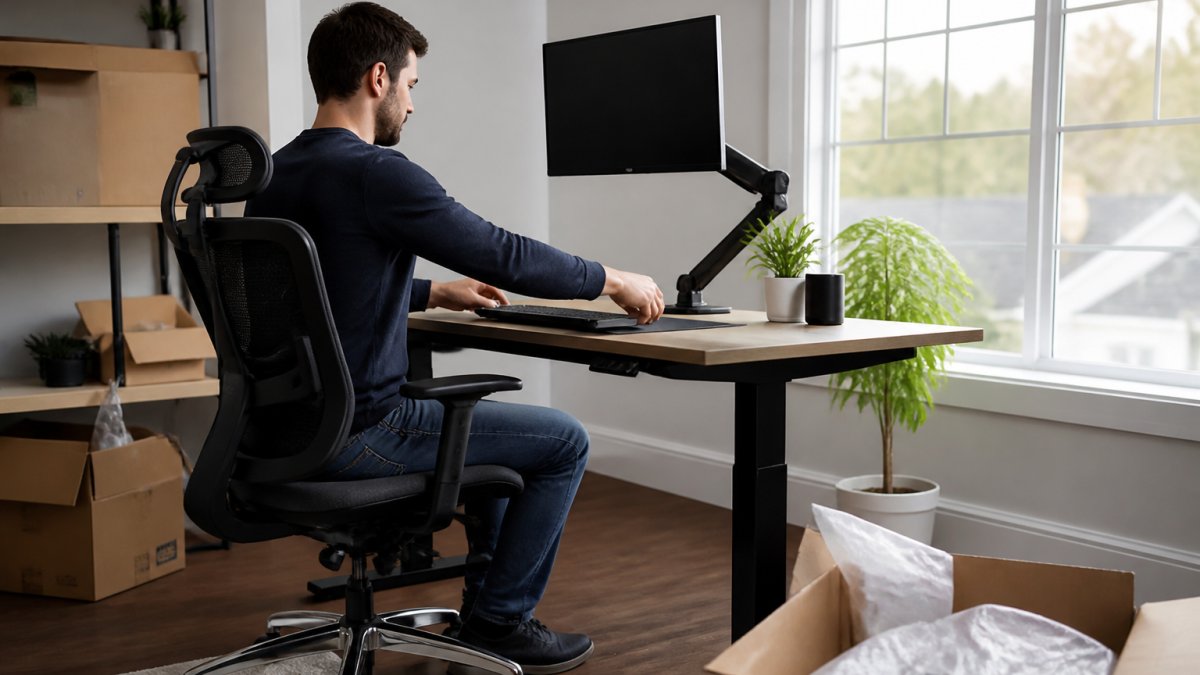
Set the chair first, then adjust the desk to the chair. Most people do it backwards, buying a desk at a fixed height and then fighting the chair to match. If your desk cannot adjust, a footrest and a keyboard tray are the cheapest fixes.
Best Ergonomic Chairs for Remote Workers
The best ergonomic chairs for remote workers share four features: adjustable seat height, adjustable lumbar support, a seat depth that fits the user’s leg length, and armrests that can be positioned so shoulders stay relaxed. Everything else is preference. This is where buying pre-owned pays off. Premium task chairs from brands like Steelcase and Herman Miller are built to be adjusted and rebuilt, and a used one in good condition typically delivers the same support as a new one at a fraction of the cost. When you evaluate a used chair, check the gas cylinder (does it hold height?), the mesh or foam (is it sagging?), and whether the adjustment levers still move freely. A chair that adjusts properly is worth more than one that merely looks expensive.
The most common mistake with used chairs is skipping the cylinder test. A chair that slowly sinks under weight is unusable for full workdays, and cylinder replacement on some models costs more than the chair is worth. Sit in it for a full minute before you buy.
Cost-Effectiveness: Ergonomic Office Furniture Buying Guide
An ergonomic office furniture buying guide should start with a simple truth: the expensive part of bad ergonomics is replacement, not purchase. Cheap chairs that break in a year, desks that wobble, and monitor arms that droop all get bought twice. Durable, adjustable furniture bought once, even secondhand, usually costs less over several years than a cycle of budget replacements. That is the core of the cost-effectiveness argument, and it is why so many remote workers and small teams now shop pre-owned. Office Furniture Warehouse stocks new and pre-owned pieces across a four-acre inventory, which means you can match a chair, desk, and storage from the same style family without paying new-retail prices. Pricing depends on the specific pieces, quantity, and delivery, so check current availability and request a quote rather than assuming a figure.
Using a Remote Employee Home Office Stipend Wisely
A remote employee home office stipend is an allowance an employer provides to cover home workspace costs, and how it is spent determines whether it actually helps. The wisest sequence is chair first, desk second, monitor riser or arm third, peripherals last. Resist the urge to spread a stipend across decorative items before the fundamentals are covered. If your stipend is modest, pre-owned premium furniture stretches it furthest: a used Steelcase or Herman Miller chair often fits within a typical allowance where a new equivalent would not. Keep receipts and confirm what your employer’s policy covers before buying, since stipend rules vary by company. For teams administering stipends, our design and layout guidance can help standardize what employees order so setups stay consistent and supportable.
Conclusion
Furnishing a home workspace well is a decision most remote workers only make once, and getting the fundamentals right, chair, desk height, monitor position, saves money and protects the body that does the work. If you are outfitting a home office or a whole remote team, Office Furniture Warehouse can help: we offer expert design and layout planning, new and pre-owned furniture from premium brands at significant savings, and flexible pickup or delivery options. Visit our showroom and let our team help you build a setup that lasts.
Frequently Asked Questions
What are the benefits of ergonomic furniture for remote employees?
Ergonomic furniture supports neutral posture through the workday, which can reduce strain on the neck, back, and wrists compared with kitchen tables and sofas. Remote employees often sit longer without the movement a commute provides, so an adjustable chair and properly placed monitor matter more. The payoff shows up as fewer aches, steadier focus, and a workspace that holds up over years rather than months.
Is an ergonomic chair worth it for working from home?
For anyone logging full days at a desk, yes. A chair with adjustable seat height, lumbar support, and armrests lets you match the seat to your body instead of compensating with cushions and bad posture. Look for models from brands like Steelcase or Herman Miller, and consider certified pre-owned options to fit a tighter budget. Pricing varies by model and condition, so check current listings for a quote.
How should a remote worker set up an ergonomic desk?
Start with the chair: set seat height so feet rest flat and thighs are roughly parallel to the floor. Raise the monitor so the top of the screen sits near eye level and about an arm’s length away. Keep the keyboard and mouse close enough that elbows stay near 90 degrees, and add a footrest if your desk will not lower enough. Take short movement breaks every 30 to 60 minutes.
Can ergonomic furniture improve productivity while working remotely?
Discomfort pulls attention away from work. When your neck, back, and wrists are supported, you spend less of the day shifting positions and managing aches, which helps sustain focus through longer stretches. A stable, organized desk also cuts down on small interruptions. The gains are gradual rather than dramatic, but remote workers who invest in their setup commonly report feeling less drained by the end of the day.
