Table of Contents
- Quick Comparison: Best Office Desks for Productivity
- How We Evaluated These Office Desks
- 1. Uplift V3 Standing Desk: Best Overall for Height Adjustability
- 2. Eureka Ark ES: Best Premium Executive Standing Desk
- 3. VertDesk v3 L: Best L-Shaped Desk for Multi-Monitor Setups
- 4. Branch Daily Desk: Best Minimalist Desk for Home Offices
- 5. OTG SL13: Best Desk with Integrated Storage
- 6. Bestar 120885: Best Modern L-Shaped Desk
- Ergonomic Desk Setup Tips for Better Focus
- The Benefits of Standing Desks for Focus
- How to Organize Your Desk for Productivity
- Frequently Asked Questions
Last Updated: September 15, 2026
Quick Comparison: Best Office Desks for Productivity
The best office desks for productivity balance ergonomic adjustability, stability, and workspace layout. At Office Furniture Warehouse, we have spent 35 years helping teams furnish workspaces, and buyers who match the desk to their daily tasks get more done than spec-chasers.
Here is the shortlist before the detail:
- Best overall for height adjustability: Uplift V3 Standing Desk
- Best premium executive pick: Eureka Ark ES
- Best L-shaped for multi-monitor setups: VertDesk v3 L
- Best minimalist home office option: Branch Daily Desk
- Best with integrated storage: OTG SL13
- Best modern L-shaped design: Bestar 120885
An office desk is the primary work surface in a workspace, and its height, depth, and stability determine how comfortably you sit or stand through a full day. Below, we break down six desks against the criteria that matter, plus the setup and organization habits that turn any of them into a productivity tool.
How We Evaluated These Office Desks
We scored each desk on five factors: height-adjustment range, frame stability at standing height, workspace dimensions, material durability, and cable management. Assembly effort and warranty coverage carried weight too, because a desk that wobbles or takes a weekend to build undercuts the productivity it promises.
A common mistake is buying on surface area alone. Depth matters more than width for monitor distance and posture; a shallow desk forces a hunched position no lumbar support can fix.
1. Uplift V3 Standing Desk: Best Overall for Height Adjustability
The Uplift V3 is the strongest all-round pick for a motorized sit-stand desk without executive pricing. Its electric height adjustment covers a wide range to fit different statures, and stability at standing height holds up better than most rivals in its class.
Pros: Excellent stability at standing heights; highly customizable to fit office aesthetics.
Cons: Assembly can be time-consuming.
2. Eureka Ark ES: Best Premium Executive Standing Desk
Executive offices get a desk that looks the part and adjusts from 29.5 to 47.25 inches. The Eureka Ark ES pairs a premium build with integrated cable management, keeping the workspace clean without add-on trays.
Pros: Sophisticated design suited to executive settings; smooth, quiet motor.
Cons: Higher price point than standard models.
3. VertDesk v3 L: Best L-Shaped Desk for Multi-Monitor Setups
Multi-monitor users run out of desk long before they run out of tasks. The VertDesk v3 L turns a corner into usable surface, with an electric height-adjustable frame and heavy-duty construction.
If you are coming from a straight desk, place the L-return on your non-dominant side. Right-handed users who put the return on the left keep their writing and mouse arm on the long edge, which reduces reach and strain across a full day.
Pros: Maximizes corner space; sturdy frame prevents wobbling.
Cons: Requires significant floor space.
4. Branch Daily Desk: Best Minimalist Desk for Home Offices
Remote workers who want a clean, functional surface without a motor get a durable laminate top and a minimalist aesthetic that fits small home offices.
Pros: Simple, quick assembly; fits smaller home office environments.
Cons: Limited built-in storage options.
5. OTG SL13: Best Desk with Integrated Storage
Anyone drowning in paperwork should start here. The OTG SL13 is a traditional L-shaped desk with an integrated hutch that adds vertical storage above the work surface, keeping the desktop clear.
Pros: Excellent organizational capacity with the hutch; classic professional appearance.
Cons: Not height-adjustable.
6. Bestar 120885: Best Modern L-Shaped Desk
Modern interiors get a desk with clean lines and a durable work surface that handles a full computer setup. The Bestar 120885 offers versatile configuration options, adapting to a room’s layout rather than dictating it.
Pros: Visually appealing for modern interiors; ample space for computer equipment.
Cons: Heavy and difficult to move once assembled.
Ergonomic Desk Setup Tips for Better Focus
A good desk is only half the equation. Ergonomic setup determines whether you stay comfortable past the first hour, and it comes down to four measurements: seated elbow height, monitor distance, keyboard angle, and standing-height range.
Start with seated elbow height. Adjust your chair so your forearms rest roughly parallel to the floor, then set the desktop surface to meet that height. For most adults this lands between 28 and 30 inches, which is why fixed desks in that range work for average statures but fail taller and shorter users (osha.gov). If your fixed desk is the wrong height, a keyboard tray or adjustable chair is cheaper than replacing it.
Set monitor distance by depth, not diagonal. Ergonomics practitioners recommend an arm’s length, roughly 20 to 40 inches, between your eyes and the screen, with the top of the display at or just below eye level (osha.gov). Desk depth matters more than width: a 30-inch-deep desktop lets you push a 27-inch monitor back comfortably, while a 24-inch-deep desk forces it forward and pulls your head into a forward posture. If you cannot change the desk, a monitor arm clamped to the rear edge reclaims 6 to 10 inches of effective depth.
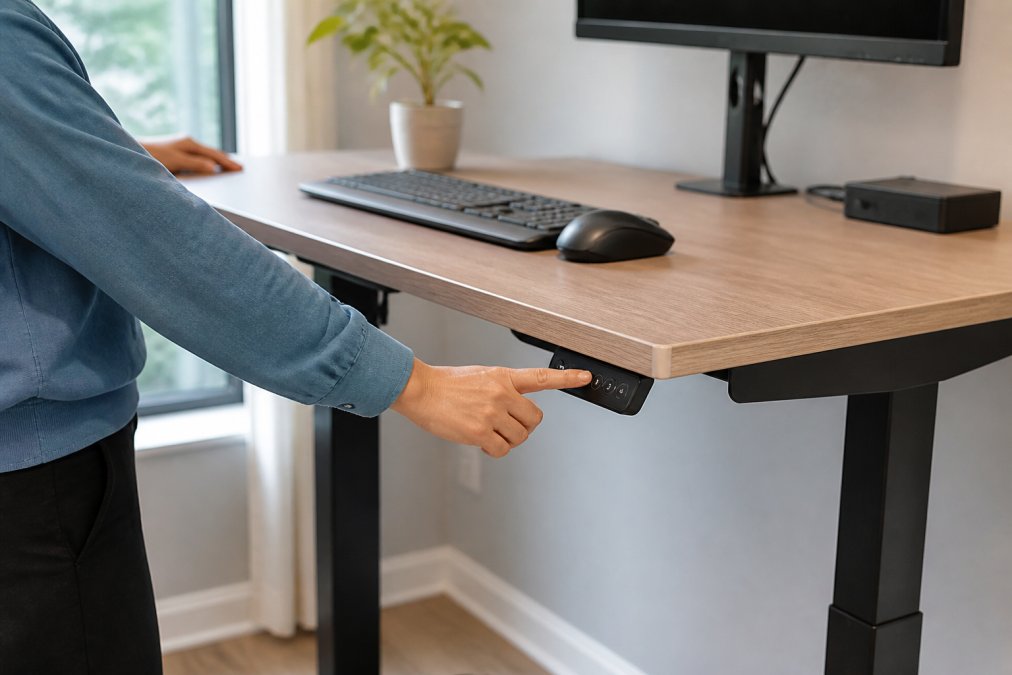
Keep wrists neutral, not flat. A slight negative tilt on the keyboard, front edge lower than the back, keeps wrists neutral. Many height-adjustable desks pair with a keyboard tray for this reason, and some frames include a programmable memory preset to return to seated height with one button.
Match standing height to your frame, not the desk’s maximum. A frame topping out around 47 to 50 inches fits most users under about 6’2″; taller users should look for frames rated to 50 inches or above (The Effect of Sit-Stand Desks on Office Worker Behavioral and Health Outcomes). When standing, elbows should still sit near 90 degrees and the monitor should rise with you, on a monitor arm or a desk that carries the display up with the surface.
Add the three accessories that do the most work. A footrest for shorter users (or an anti-fatigue mat for taller ones), a lumbar-supporting chair adjusted to the small of your back, and a monitor arm. These address most complaints that send people back to a fixed setup.
Ergonomics is a measurement problem before it is a furniture problem. Fix elbow height, monitor distance, and wrist angle first, then decide whether the desk itself needs to change.
A note for sensory-sensitive and neurodivergent users. Standard ergonomic advice assumes a neurotypical tolerance for visual and auditory input. If screen glare, cable clutter, or motor hum distracts you, prioritize a matte desktop finish, route every cable out of sight, and choose a quiet dual-motor lift over a single-motor frame that whines under load. A consistent layout also reduces the cognitive tax of re-orienting every morning, the same reason many practitioners recommend taping monitor and keyboard positions once you find a setup that works.
The Benefits of Standing Desks for Focus
The benefits of standing desks for focus come down to movement and alertness.
How to Organize Your Desk for Productivity
Match storage type to what you actually store.
If you work in a small apartment or a shared room, treat the desk as multi-functional furniture. A compact straight desk with a monitor arm and a rolling pedestal does more with less floor area than an L-shaped desk, and it can be cleared for non-work use in under a minute.
Frequently Asked Questions
What features should I look for in a high-productivity office desk?
Prioritize height adjustability, surface area, and stability. A height-adjustable desk lets you alternate between sitting and standing, which helps reduce sedentary time. Look for a weight capacity that supports your monitor arm and equipment, and check for cable management features like trays or grommets. If you use multiple monitors, an L-shaped desk provides more usable surface. Also consider assembly requirements and warranty coverage, since a sturdy frame and reliable motor matter for long-term use.
Does a standing desk actually increase productivity?
Research on sit-stand desks shows mixed results for direct productivity gains, but many users report improved focus and reduced discomfort when alternating positions. The benefits of standing desks for focus often come from reduced sedentary time and better posture, which can help you stay engaged during long work sessions. The key is to switch positions regularly rather than standing all day. Pairing a height-adjustable desk with an ergonomic desk setup tips like monitor at eye level and keyboard at elbow height can make the transition more effective.
How does desk size impact daily productivity?
Desk size affects how you organize your workspace and whether you can keep essential tools within reach. A 32-inch desk works for a single laptop, but dual monitors or paperwork require at least 48 to 60 inches of width. L-shaped desks add corner space for a second screen or reference materials. If your desk is too small, you may end up stacking items or working around clutter, which breaks focus. Measure your room and equipment before choosing a size.
What is the best desk layout for deep work?
For deep work, position your monitor at eye level and an arm’s length away, with the keyboard and mouse close enough that your elbows stay at 90 degrees. Keep the surface clear except for what you need for the current task. Use a cable tray or monitor arm to free up desktop space. If you have an L-shaped desk, use the secondary surface for reference materials or a notepad, not as a dumping ground. An organized desk reduces visual distractions and helps you stay in a focused state longer.
How do I organize my desk for productivity without spending a lot?
Start by removing everything you do not use daily. Group similar items together, like pens in one spot and charging cables in another. Use a monitor arm or a small shelf to lift your screen and free up surface area. A cable tray or adhesive clips can route cords out of sight. If your desk lacks storage, a rolling file cart or a wall-mounted shelf keeps paperwork accessible but off the desktop. These small changes cost little and make it easier to find what you need without breaking focus.
